
What is Web Analytics? A Practical Guide for Small Businesses
Introduction
Every website generates information about how people find it and what they do when they arrive. Web analytics helps turn that information into something a business can understand and use.
At its simplest, web analytics can tell you how many people visit your website, which pages they use, where they came from and how they interact with your content. More importantly, it can help you understand whether those visitors are doing the things you want them to do.
That might mean completing a contact form, making a purchase, requesting a quotation, downloading a guide, subscribing to a newsletter or simply finding important information.
The value of analytics therefore isn’t in collecting large quantities of data. It is in using the right information to answer useful questions.
Which pages attract potential customers? How are people discovering your website? Where do visitors leave? Which marketing activities bring useful traffic? Are people completing important actions? Are changes to your website producing better results?
Web analytics can help answer these questions and provide evidence for decisions that might otherwise be based largely on assumptions.
In this guide, we’ll look at the information web analytics can provide, some of the measurements worth understanding and, most importantly, how small businesses can use that information to make practical improvements to their websites and digital activity.
What Is Web Analytics?
Web analytics is the process of collecting, measuring and analysing information about how people use a website.
Analytics tools record different types of activity and organise that information into reports. These can help you understand how visitors arrive at your website, which pages they view, how they move between pages and whether they complete important actions.
The purpose isn’t simply to count visitors.
A website with a large amount of traffic isn’t necessarily performing effectively for the business. A smaller number of relevant visitors who enquire, purchase, subscribe or complete another valuable action may be far more useful.
Web analytics therefore becomes most valuable when the data is connected to a business objective.
If your website is intended to generate enquiries, for example, analytics can help you understand which pages attract visitors, how those visitors reach your contact or booking pages and whether they complete an enquiry.
Similarly, if you publish useful content to build awareness and authority, analytics can help show which subjects attract attention and whether readers go on to explore other parts of your website.
Web analytics provides the evidence. The important part is deciding what that evidence means and what, if anything, you should do as a result.
What Can Web Analytics Tell You?
Web analytics can provide information about many different aspects of your website, but the most useful measurements are those that help answer practical questions about your visitors and your business.
You can use analytics to understand how many people are visiting your website, whether they are new or returning visitors and which pages receive the most attention.
It can also show how people found you. Visitors might arrive through a search engine, another website, social media, an email campaign, paid advertising or by entering your web address directly.
Once visitors arrive, analytics can help you understand what they do next. Which pages do they view? How long do they engage with your website? Do they move on to other pages or leave? Do they complete the actions you hoped they would?
This information can reveal patterns that would otherwise be difficult to see.
For example, you might discover that an article attracts significant traffic but very few visitors continue to your service pages. A particular service page might receive relatively little traffic but generate a high proportion of enquiries. Visitors from one source may be considerably more likely to complete an important action than visitors from another.
None of these measurements tells the whole story by itself.
The real value comes from combining them to build a clearer picture of how people discover your website, what they do when they arrive and whether the website is helping them — and your business — achieve the intended outcome.
Users, Sessions and Page Views
Three of the most common measurements you will encounter in web analytics are users, sessions and page views. They describe different aspects of website activity, so understanding the distinction between them is useful.
A user represents a person or device interacting with your website, although analytics systems cannot always identify individual people perfectly. One person using several devices or browsers, for example, may sometimes be counted separately.
A session represents a period of activity on your website. During a single session, someone might arrive on your homepage, visit a service page, read an article and then complete a contact form. Those interactions form part of the same visit or session.
Page views count the occasions on which pages are viewed. If one visitor looks at five pages during a session, those pages contribute five page views.
These measurements become more useful when considered together.
For example, a high number of page views might indicate that visitors are exploring your content, but it could also mean that people are struggling to find what they need. A low number of pages viewed per session isn’t necessarily a problem either — someone might arrive directly on the right page, find the information they need and complete an enquiry immediately.
Context matters.
Rather than trying to maximise users, sessions or page views simply because the numbers are available, use them to understand how people are using your website and whether that behaviour supports the purpose of the site.
Where Are Your Visitors Coming From?
Knowing how people reach your website can help you understand which parts of your digital activity are actually bringing visitors to you.
Analytics tools usually group traffic into different sources or channels. These might include organic search, direct visits, referrals from other websites, social media, email campaigns and paid advertising.
Organic search traffic comes from people who discover your website through unpaid search results. Referral traffic arrives through links on other websites, while social traffic can show visitors coming from social media platforms. Campaign links can also help you identify traffic generated by particular emails, promotions or other marketing activities.
Direct traffic is less straightforward. Although it can include people entering your web address or using a bookmark, it may also contain visits where the analytics system cannot determine the original source.
The numbers become particularly useful when you look beyond which channel sends the most traffic.
A source generating hundreds of visitors is not necessarily more valuable than one sending a much smaller number of highly relevant prospects. Visitors from one channel might read an article and leave, while visitors from another may be more likely to visit a service page, download a guide or make an enquiry.
Understanding where visitors come from therefore helps you assess not only which activities generate traffic, but which sources are contributing to the outcomes that matter to your business.
Which Pages Are People Using?
Looking at which pages people visit can help you understand what attracts their attention and which parts of your website are contributing most to its purpose.
Some pages may receive traffic because they rank well in search results. Others might be reached through your navigation, links from other websites, social media or marketing campaigns. Understanding which pages act as entry points can reveal how visitors are first encountering your business.
Popular pages can also provide useful clues about what your audience is interested in. If particular articles, services or topics consistently attract visitors, that information can help guide future content and website improvements.
But popularity alone doesn’t necessarily make a page successful.
A service page receiving relatively few visits might generate a significant number of enquiries. An article attracting hundreds of visitors might generate awareness but do little to encourage people to explore the rest of the website. Another page might receive plenty of traffic but lose visitors before they take the next step.
It is therefore useful to look at individual pages in context. Consider how visitors arrive, what they do on the page, where they go next and whether the page contributes to an important business objective.
This can help identify pages that are performing well, pages that deserve more visibility and pages that may need clearer content, stronger internal links or a more obvious next step.
Understanding Engagement and Visitor Behaviour
Knowing that someone visited a page is useful, but understanding how they interacted with your website can tell you much more.
Engagement measurements can help indicate whether visitors are actually using your content rather than simply arriving and leaving. Depending on the analytics system and how it has been configured, you might be able to measure activities such as scrolling through a page, clicking links, watching a video, downloading a document or moving to another part of the website.
Time-based measurements can also provide useful context. If visitors consistently spend time reading a detailed guide, for example, that may suggest the content is holding their attention. If people regularly leave an important service page almost immediately, it may be worth investigating why.
However, visitor behaviour needs to be interpreted carefully.
Someone spending only a short time on a page isn’t necessarily a negative result. They may have found the telephone number, opening time or answer they needed within seconds. Equally, a long visit doesn’t automatically mean that someone had a good experience — they might have been struggling to find the information they wanted.
This is why individual metrics should rarely be considered in isolation.
Look instead for patterns. Are visitors following the routes through the website that you expected? Are they engaging with important content? Do particular pages encourage people to continue exploring? Where do visitors appear to abandon a journey before completing an important action?
Used in this way, engagement data can help identify areas where clearer content, better navigation or a more obvious next step could improve the experience your website provides.
Conversions: Are Visitors Taking the Actions You Want?
Traffic and engagement are useful measurements, but ultimately your website exists for a reason. A conversion occurs when a visitor completes an action that contributes to that purpose.
For an online shop, the most obvious conversion is a purchase. For a service business, it might be submitting an enquiry form, requesting a quotation or booking a consultation. Other useful actions could include making a telephone call, downloading a guide, joining a mailing list or registering for an event.
Not every conversion has to represent an immediate sale.
A visitor downloading a useful guide or subscribing to your newsletter may be showing an interest in your business without being ready to buy. Tracking these actions can help you understand how the website contributes at different stages of a potential customer’s journey.
Conversion data becomes particularly useful when combined with other analytics information.
You might discover that one service page generates more enquiries than another, that visitors arriving through organic search are more likely to contact you, or that an article regularly leads readers towards a particular service. Conversely, you may find that an important page receives plenty of visitors, but very few take the intended next step.
This gives you something practical to investigate. Perhaps the call to action isn’t clear enough. The page may not provide sufficient information or reassurance. The enquiry process might be unnecessarily complicated, or the visitors reaching the page may simply be looking for something different.
The objective isn’t to turn every visitor into a customer. It is to understand which actions matter to your business, measure them appropriately and use that information to improve the journey from visitor to potential customer.
Web Analytics and SEO
Web analytics can provide valuable information about how visitors from search engines behave once they arrive on your website.
It can show which pages attract organic search traffic, whether those visitors explore other parts of the site and whether they complete useful actions such as submitting an enquiry, downloading a guide or making a purchase.
This can help you assess whether your SEO activity is attracting the right kind of visitors rather than simply generating more traffic.
For example, an article may receive a growing number of visitors from search but generate little further engagement. Another page may attract fewer search visitors but regularly lead to enquiries or visits to important service pages. Understanding these differences can help you decide where content should be improved, expanded or better connected to other parts of the website.
Analytics can also help identify changes over time. If organic traffic to an important page rises or falls, you can investigate what has changed and whether further action is needed.
However, web analytics does not provide the complete picture of search performance.
To understand how your website is actually appearing in Google Search — including the queries people use, impressions, clicks and average search positions — you need search performance data such as that provided by Google Search Console.
Used together, website analytics and search performance data can provide a much clearer picture: how people discover your website through search, and what they do after they arrive.
Google Analytics and Google Search Console: Different Jobs
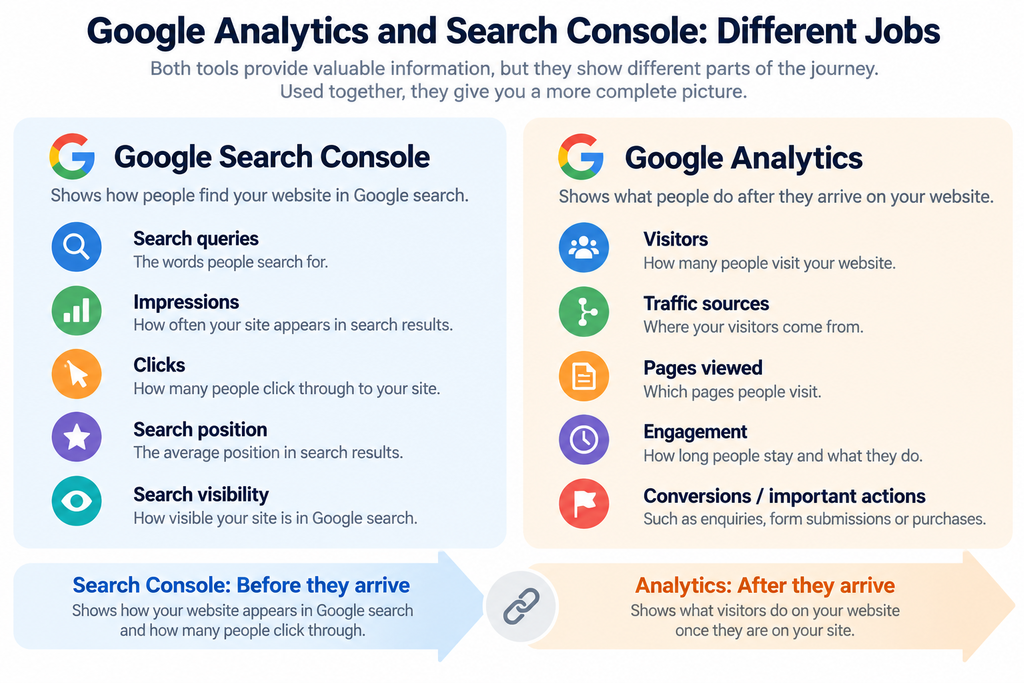
Google Analytics and Google Search Console are both valuable tools for understanding website performance, but they provide different types of information.
Google Analytics primarily helps you understand what happens on your website. It can show how visitors arrive, which pages they use, how they interact with your content and whether they complete important actions.
Google Search Console focuses specifically on your website’s presence in Google Search. It can show which search queries generate impressions and clicks, which pages appear in search results, their average positions and click-through rates.
A simple way to think about the difference is:
Google Search Console helps you understand what happens before someone reaches your website from Google Search.
Google Analytics helps you understand what happens after they arrive.
For example, Search Console might show that a particular page appeared 1,000 times in Google Search and received 50 clicks. Analytics can then help you understand what those visitors did after reaching the website — whether they engaged with the page, explored other content or completed an important action.
Neither tool provides the complete picture on its own.
Using them together can help you connect search visibility with actual visitor behaviour and business outcomes. Instead of asking only, “Are people finding us in Google?”, you can begin asking the more useful question: “Are the people finding us through search doing something valuable when they arrive?”
Don’t Measure Everything Just Because You Can
Modern analytics tools can collect an enormous amount of information. That doesn’t mean you need to monitor all of it.
One of the easiest mistakes to make with web analytics is to become distracted by numbers simply because they are available. Reports can contain dozens of metrics, charts and comparisons, but collecting more data doesn’t automatically lead to better decisions.
Start instead with the questions that matter to your business.
If your website is intended to generate enquiries, you might want to know which pages bring potential customers to the site, where those visitors come from and how many go on to contact you.
If you sell online, purchases, product views and the journey towards checkout may be more important. If your website primarily publishes useful information, you may be interested in which subjects attract visitors and whether those readers explore related content.
This also helps avoid placing too much importance on what are sometimes called vanity metrics — numbers that look impressive but provide little indication of whether the website is achieving its purpose.
A large increase in traffic, for example, sounds positive. But if those additional visitors aren’t interested in your products, services or content, the increase may have little business value.
Choose a small number of meaningful measurements that relate to what you are trying to achieve. Once you know what you need to understand, analytics becomes much easier to use.
The objective isn’t to produce more reports. It is to find the information that helps you make better decisions.
Turning Analytics Data Into Useful Decisions
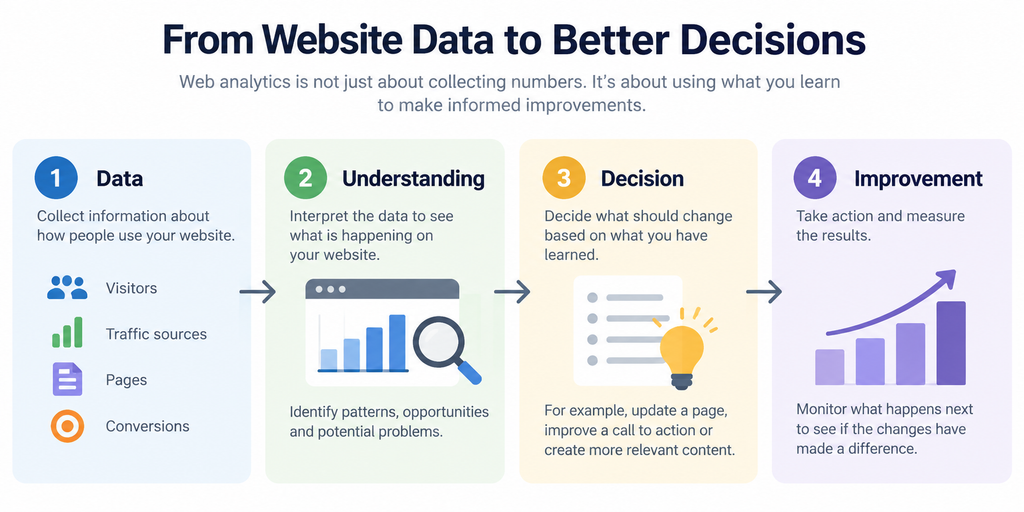
Collecting data is only the beginning. The real value of web analytics comes from using what you learn to make informed improvements.
A useful approach is to move from data to understanding, from understanding to a decision, and from that decision to an improvement.
Suppose an important service page receives plenty of visitors but generates very few enquiries. The number itself doesn’t tell you what to change, but it gives you a reason to investigate.
You might review the page and discover that the service isn’t explained clearly, the call to action is difficult to find, or visitors aren’t being given enough information to make a decision. You can then make a specific improvement and monitor what happens afterwards.
Analytics can work in the opposite direction too. If a particular article consistently attracts relevant visitors who then explore your services, that may indicate an opportunity to create more content around the same subject or strengthen the links between that content and your commercial pages.
The same principle applies to traffic sources. If one marketing activity produces relatively few visitors but a high proportion become enquiries, while another generates substantial traffic with little meaningful activity, that information can influence where you spend your time and marketing budget.
Try to avoid making significant decisions based on a single day’s figures or one unusual change. Look for patterns over a meaningful period and consider what else might have affected the results, such as seasonality, a marketing campaign or changes to the website.
Web analytics doesn’t make decisions for you. It provides evidence that can help you make better ones.
The most useful cycle is therefore simple: measure what matters, understand what the data is telling you, make an informed change and then measure again.
Privacy, Consent and Responsible Analytics
Web analytics can provide valuable information about how people use your website, but that information needs to be collected responsibly.
Depending on the analytics tools you use and how they are configured, information may be stored about visitors, their devices and their activity on your website. Cookies and similar technologies may also be used to recognise visitors or measure behaviour across different visits.
For UK businesses, this means considering requirements such as the UK GDPR and the Privacy and Electronic Communications Regulations (PECR), particularly where cookies or other tracking technologies are involved.
Your website should clearly explain what information is being collected and why. Where consent is required, visitors should be given an appropriate choice before the relevant tracking technologies are used.
It is also worth remembering that analytics data is rarely a perfect record of every website visit. Cookie choices, browser privacy settings, tracking protection, ad blockers and technical configuration can all affect what is recorded.
This doesn’t make analytics data useless. It simply means the figures should be treated as measurements rather than an exact count of every person and every action.
Responsible analytics is therefore about more than installing a tracking tool. It means collecting information for a clear purpose, respecting visitors’ privacy and using the data you genuinely need to understand and improve your website.
For most small businesses, the objective shouldn’t be to track as much as possible. It should be to collect enough appropriate information to make useful decisions while respecting the people who use the website.
A Practical Web Analytics Checklist
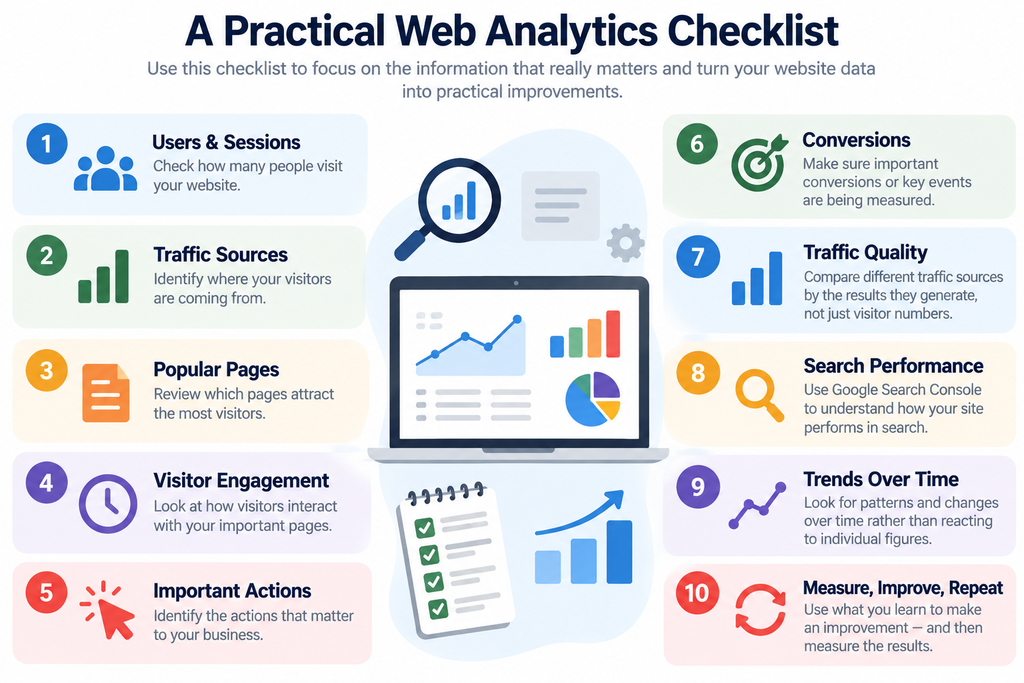
You don’t need to monitor every available metric to get useful information from web analytics. Start with the measurements that help you understand whether your website is doing its job.
Use this checklist as a practical starting point:
- Check how many users and sessions your website receives.
- Identify where your visitors are coming from.
- Review which pages attract the most visitors.
- Look at how visitors engage with your important pages.
- Identify the actions that matter to your business.
- Make sure important conversions or key events are being measured.
- Compare different traffic sources by the results they generate, not just visitor numbers.
- Use Google Search Console alongside your website analytics to understand search performance.
- Look for patterns and changes over time rather than reacting to individual figures.
- Use what you learn to make an improvement — and then measure the results.
The purpose of the checklist isn’t to create another reporting exercise. It is to establish a simple routine for understanding what is happening on your website and identifying where improvements could make a difference.
Web Analytics Is an Ongoing Process
Web analytics isn’t something you configure once, check occasionally and then forget about.
Your website changes. New pages and articles are added, services evolve and marketing activity changes. The way people find and use your website can change too. Search behaviour, technology, competitors and customer expectations all continue to develop.
This means analytics is most useful when it becomes part of a regular process of reviewing and improving your website.
You don’t necessarily need to examine reports every day. For many small businesses, a regular monthly review of a few important measurements may provide far more value than constantly watching traffic figures.
Look at what has changed since your previous review. Which pages are attracting more or fewer visitors? Have traffic sources changed? Are important actions being completed? Is recently published or updated content beginning to attract visitors? Are there unexpected changes that deserve further investigation?
You can then use what you discover to decide whether anything needs attention.
Sometimes the right decision will be to change something. At other times, particularly when there isn’t enough data yet, the sensible decision may simply be to continue measuring.
Over time, this creates a useful cycle of measurement, understanding and improvement.
Rather than treating analytics as a collection of reports, make it part of the way you manage your website. Regularly reviewing a small number of meaningful measurements can help you recognise opportunities, identify problems earlier and make better-informed decisions about what to improve next.
Conclusion
Web analytics helps turn website activity into information you can use.
It can show how people find your website, which pages they use, how they interact with your content and whether they complete the actions that matter to your business.
But the value of analytics doesn’t come from collecting more data. It comes from asking useful questions, choosing the right measurements and understanding what those measurements mean in the context of your website and business objectives.
Used alongside tools such as Google Search Console, analytics can also help connect search visibility with what happens after someone reaches your website. This provides a much clearer picture than traffic figures or search rankings alone.
Most importantly, analytics should lead to action. Identify what is happening, investigate why, make an informed improvement and then measure what happens next.
You don’t need complicated dashboards or dozens of reports to benefit from web analytics. A small number of meaningful measurements, reviewed regularly and used intelligently, can provide the evidence you need to make better decisions about your website and your wider digital activity.
Want to Understand What Your Website Is Really Doing?
Your website may be attracting visitors, but do you know where they are coming from, which pages are working effectively and whether those visitors are taking the actions you want?
Web analytics can help turn website activity into practical information you can use to make better decisions.
Start by identifying what you want your website to achieve, measure the activity that matters and use what you learn to decide where improvements could make the greatest difference.
If you would like an independent view of your wider online presence, our Digital Health Check provides a practical starting point for identifying opportunities to improve your website, search visibility and digital activity.