
On-Page SEO: A Practical Guide to Optimising Your Website

Introduction
On-page SEO is the process of improving the content and structure of individual web pages so they are useful to visitors and easier for search engines to understand.
It covers many of the elements you can directly control on your own website: the content you publish, page titles and headings, internal links, images, URLs and the way information is organised. These elements work together to help search engines understand what a page is about and, more importantly, help visitors quickly find the information they came looking for.
On-page SEO was once frequently associated with placing particular keywords in particular positions on a page. Keywords still have a role in helping us understand how people search, but modern on-page optimisation is much broader. The starting point should be the person carrying out the search: what are they trying to find, what information do they need, and does your page provide a useful answer?
This means that good on-page SEO and good website content increasingly go hand in hand. A clearly structured page that answers genuine customer questions, provides useful information and makes it easy to find the next step is valuable to visitors as well as search engines.
In this guide, we’ll look at the main elements of on-page SEO and the practical improvements small businesses can make to create pages that are easier to understand, easier to use and more likely to be discovered by the right people.
What Is On-Page SEO?
On-page SEO refers to the improvements you make directly to individual pages on your website to help search engines understand their content and to provide a better experience for the people visiting them.
This distinguishes it from off-page SEO, which concerns signals beyond your own website, such as links, mentions, reviews and wider online reputation. Technical SEO is another related area, concentrating more specifically on the technical foundations that allow search engines to access, crawl and understand a website.
On-page SEO brings together several elements within the page itself. These include the written content, page title, headings, images, links and URL, as well as how clearly the information is structured and presented.
However, optimising a page doesn’t mean mechanically inserting a target keyword into each of these elements. The objective is to make the purpose and subject of the page clear while providing information that genuinely satisfies the needs of the visitor.
For example, a service page should clearly explain the service being offered, who it is intended for and what someone should do next. An informational article should answer the question or subject that brought the visitor to the page and make related information easy to discover.
When these elements work together, search engines have clearer information about the page, and visitors have a more useful experience.
That combination is at the heart of modern on-page SEO: creating pages that are easy to understand, relevant to the search and genuinely useful to the people who find them.
Start With Search Intent
Before optimising a page, it is important to understand why someone might be searching for the information it contains. This is known as search intent.
Two searches can use similar words while representing very different needs. Someone searching for “what is on-page SEO?” is probably looking for an explanation, while someone searching for “SEO consultant Surrey” is much more likely to be looking for a business that can provide a service. The page that best serves one of these searches may be completely unsuitable for the other.
Understanding search intent therefore helps determine what type of page you should create and what information it needs to contain.
An informational article might explain a subject, answer common questions and direct readers towards related resources. A service page needs to explain what the service provides, who it is intended for and how a potential customer can take the next step. A product page needs different information again.
This is also why choosing a keyword and repeatedly adding it to a page is not an effective approach to modern on-page SEO. Keywords can help identify the language people use when searching, but the content still needs to satisfy the reason behind the search.
Before creating or improving a page, consider what someone arriving from a search engine is likely to want to know. Then make sure the page provides that information clearly and without making them work unnecessarily hard to find it.
When the page’s purpose matches the intention behind the search, you have a much stronger foundation for everything else you do to optimise it.
Create Useful, People-First Content
Once you understand the intent behind a search, the next step is to create content that genuinely helps the person who arrives on the page.
Search engines have become increasingly sophisticated at understanding content and the relationships between words, subjects and ideas. This means there is little value in writing awkward copy simply to repeat particular keywords. Your primary audience should be the people you want to reach, not the search engine examining the page.
Useful content should answer the questions a visitor is likely to have and provide enough information for them to understand the subject or make an informed decision. That does not necessarily mean writing very long pages. The appropriate amount of content depends on the subject, the purpose of the page and what the visitor needs.
Originality also matters. Repeating information that can be found on hundreds of other websites provides little reason for someone to choose your page. Small businesses often have an advantage here because they can draw on genuine experience: the questions customers regularly ask, problems they encounter, examples from real projects and knowledge developed through actually providing a product or service.
Content should also be easy to read and navigate. Use clear language, sensible paragraphs and descriptive headings to break complicated subjects into manageable sections. Where another page on your website provides useful supporting information, link to it rather than trying to explain everything again.
Good on-page SEO therefore begins with useful content rather than optimisation techniques. If a page does not provide what the visitor needs, changing its title, adding keywords or adjusting its headings will not solve the underlying problem.
Create the page for the person first, then use on-page SEO to make its purpose and content as clear as possible to search engines.
Page Titles and Meta Descriptions
Page titles and meta descriptions provide search engines with useful information about a page and can influence how it is presented within search results.
The page title should give a clear and concise indication of what the page contains. It is also commonly used as the basis for the clickable title displayed in search results, although search engines may sometimes choose to display different text if they believe it better represents the page.
Each important page should have a descriptive title that reflects its individual content. Rather than trying to fit as many keywords as possible into the title, concentrate on accurately describing the page in language that makes sense to someone scanning a set of search results.
A meta description is a short description of the page contained within its HTML. It is not normally visible when someone visits the page itself, but search engines may use it as the descriptive text beneath the title in search results.
A useful meta description should briefly explain what someone can expect to find on the page and, where appropriate, give them a reason to visit it. Search engines do not always display the description you provide, but writing a good one gives them relevant text they can potentially use.
There is no need to become preoccupied with exact character counts. Search engines can truncate titles and descriptions depending on the device, query and way the result is displayed. The priority should be to communicate the most important information clearly and place it early enough that the meaning remains apparent even if some text is shortened.
Titles and meta descriptions are relatively small elements of a web page, but they perform an important job: helping search engines understand the page while helping potential visitors decide whether it is relevant to what they are looking for.
Use Headings to Structure Your Content
Headings help organise the information on a page, making longer content easier for visitors to scan and understand. They also provide search engines with useful context about the structure and subject of the page.
The main heading, usually the H1, should clearly identify the primary subject of the page. In most cases, a page will have one main H1, followed by H2 headings for the principal sections and H3 headings where a section needs to be divided further.
This creates a logical hierarchy. Someone scanning an article should be able to look at its headings and quickly understand what the page covers and where to find the information they need.
Headings should describe the content that follows them. There is no need to force keywords into every heading or create headings purely for SEO purposes. If a relevant search term fits naturally and accurately describes the section, use it. If it does not, clarity is more important.
Headings are particularly valuable on longer pages. Breaking a large block of text into clearly labelled sections makes the content less intimidating and allows visitors to move directly to the information that interests them.
A sensible heading structure also contributes to accessibility by providing additional organisation for people navigating content with assistive technologies.
Treat headings as part of the structure of your content rather than simply as a way of making text larger or more prominent. Used properly, they make a page easier to read, easier to navigate and easier for search engines to understand.
URLs and Page Structure
The URL of a page provides another useful indication of where the page sits within your website and what its content is about.
Where possible, URLs should be simple, descriptive and easy to understand. A visitor looking at a URL such as /on-page-seo/ can immediately get an idea of what the page contains. Long URLs containing unnecessary numbers, parameters or complicated strings are much less informative.
There is no need to force multiple keywords into a URL. Choose a short description that accurately reflects the subject of the page and is likely to remain appropriate over time.
The wider structure of the website is equally important. Related pages should be organised logically so that visitors can understand where they are and easily move between relevant information. For example, an introductory SEO article might link to more detailed articles covering on-page SEO, off-page SEO and other specialist subjects.
This logical organisation also helps search engines understand the relationships between pages and identify which content is most important within different areas of the website.
Changing established URLs simply to make them slightly shorter or more keyword-focused is rarely worthwhile. If a URL already works and accurately represents the page, it is usually better to retain it. When a URL genuinely needs to change, the old address should normally be redirected to the most appropriate new location.
A clear URL and sensible website structure will not compensate for weak content, but together they contribute to a website that is easier for both visitors and search engines to navigate and understand.
Internal Linking
Internal links connect one page of your website to another. They help visitors discover related information and help search engines understand how the different pages on your website fit together.
A useful internal link should have a genuine purpose. If you mention a subject that is explained in more detail elsewhere on your website, linking to that page allows the reader to explore it without unnecessarily repeating the same information.
The words used within the link, known as anchor text, should give the reader a reasonable indication of where the link will take them. Descriptive wording such as “our guide to Google Business Profile” is more useful than vague phrases such as “click here” or “read more”.
Internal linking can also help establish relationships between broader and more specialised content. An introductory SEO guide, for example, can link to detailed articles about on-page SEO and off-page SEO, while those articles can link back to the introductory guide where readers need a wider explanation.
Service and commercial pages can benefit in the same way. Relevant articles can provide additional information for potential customers, while educational content can direct interested readers towards an appropriate service when it genuinely helps them take the next step.
Avoid adding links simply because an opportunity exists to link a particular word or phrase. Too many unnecessary links can make content distracting and reduce their usefulness. Concentrate instead on links that help the visitor understand the subject or discover a logical next piece of information.
A well-planned internal linking structure creates useful pathways through your website. It helps visitors find related content, reduces the likelihood of important pages becoming isolated and gives search engines additional context about the organisation and relationships of your content.
Optimising Images
Images can make a page more engaging, explain ideas visually and break up longer sections of content. They can also affect search visibility, accessibility and website performance, so they should be treated as part of on-page optimisation rather than simply as decoration.
Start by choosing images that genuinely contribute to the page. Photographs, illustrations, diagrams and infographics should support the surrounding content and help the visitor understand or engage with the subject.
Image file size is particularly important. Large, unnecessarily heavy images can slow down a page, especially for visitors using mobile devices or slower connections. Images should therefore be resized appropriately for the space in which they will appear and compressed sufficiently to reduce file size without noticeably damaging their quality.
File names should also be meaningful where practical. A descriptive name such as on-page-seo-checklist.jpg provides more useful information than an automatically generated name such as IMG_4587.jpg. There is no need to create long filenames filled with keywords.
Alternative text, usually referred to as alt text, describes an image when it cannot be seen and is particularly important for people using screen readers. Alt text should describe the purpose or relevant content of the image clearly and naturally. Decorative images that add no meaningful information do not necessarily require a written description.
Search engines can also use information associated with an image, including its alt text and the content surrounding it, to better understand what the image represents.
Image optimisation is therefore about more than adding keywords to alt text. Choose useful images, size and compress them appropriately, give them sensible filenames and provide meaningful alternative text where it is needed.
Done properly, images can improve the content and experience of a page without unnecessarily compromising its performance or accessibility.
User Experience, Mobile and Page Performance
On-page SEO is closely connected with the experience people have when they arrive on your website. A page may contain excellent information, but it will be considerably less useful if visitors struggle to read it, navigate it or interact with it.
Pages should be designed and structured so that their content is easy to use. Clear navigation, readable text, sensible spacing, obvious links and straightforward calls to action all help visitors understand where they are and what they can do next.
Mobile usability is particularly important. People access websites using phones, tablets and screens of many different sizes, so pages need to adapt effectively rather than being designed only for desktop computers. Text should remain readable, navigation should be easy to operate and buttons, links and forms should be practical to use on a touchscreen.
Page performance also contributes to the experience. Large images, unnecessary scripts, poorly configured plugins and other technical issues can make pages slow or unresponsive. Visitors should not have to wait unnecessarily for the information they came to find.
Google’s Core Web Vitals provide one way of measuring aspects of real-world page experience, including loading performance, responsiveness and visual stability. These measurements can help identify technical problems, but they should be considered alongside the wider experience of actually using the website.
Accessibility should form part of this thinking as well. Clear structure, appropriate headings, meaningful alternative text, sufficient contrast and interfaces that can be used in different ways make content available to a wider audience.
User experience, mobile usability and performance therefore shouldn’t be treated as separate concerns added after the content has been optimised. They are part of creating a page that works effectively for the people who visit it — which is ultimately what good on-page SEO should support.
How On-Page SEO Supports E-E-A-T
Good on-page SEO can also help demonstrate the experience, expertise, authoritativeness and trust associated with your business and its content. These principles are commonly referred to as E-E-A-T.
This does not mean adding E-E-A-T as another item to an SEO checklist. Instead, consider whether the content on the page gives visitors good reasons to believe and trust the information they are reading.
Where appropriate, demonstrate genuine first-hand experience. This might include practical examples, observations from projects, original photographs, case studies or explanations based on work you have actually carried out. Content based on real experience can provide information and insight that generic material cannot.
Expertise can be demonstrated through accurate, useful and sufficiently detailed content. Make it clear who has created the information where this is relevant, particularly for subjects where the reader needs to understand the knowledge or experience behind the advice.
Trust also extends beyond the article itself. Clear information about your business, accessible contact details, transparent policies, accurate claims and links to appropriate supporting sources can all help visitors assess the credibility of what they find.
Authoritativeness develops more broadly through reputation and recognition, so it cannot be created through on-page optimisation alone. However, well-written and well-supported content provides a stronger foundation for earning references, links and recognition elsewhere.
E-E-A-T should therefore not be treated as a technique for inserting additional SEO signals into a page. It is a useful way of asking a more fundamental question: does this page demonstrate why visitors should have confidence in the information and the organisation behind it?
For a more detailed explanation, see our guide to the Four Pillars of E-E-A-T: Building Trust and Authority Online.
A Practical On-Page SEO Checklist
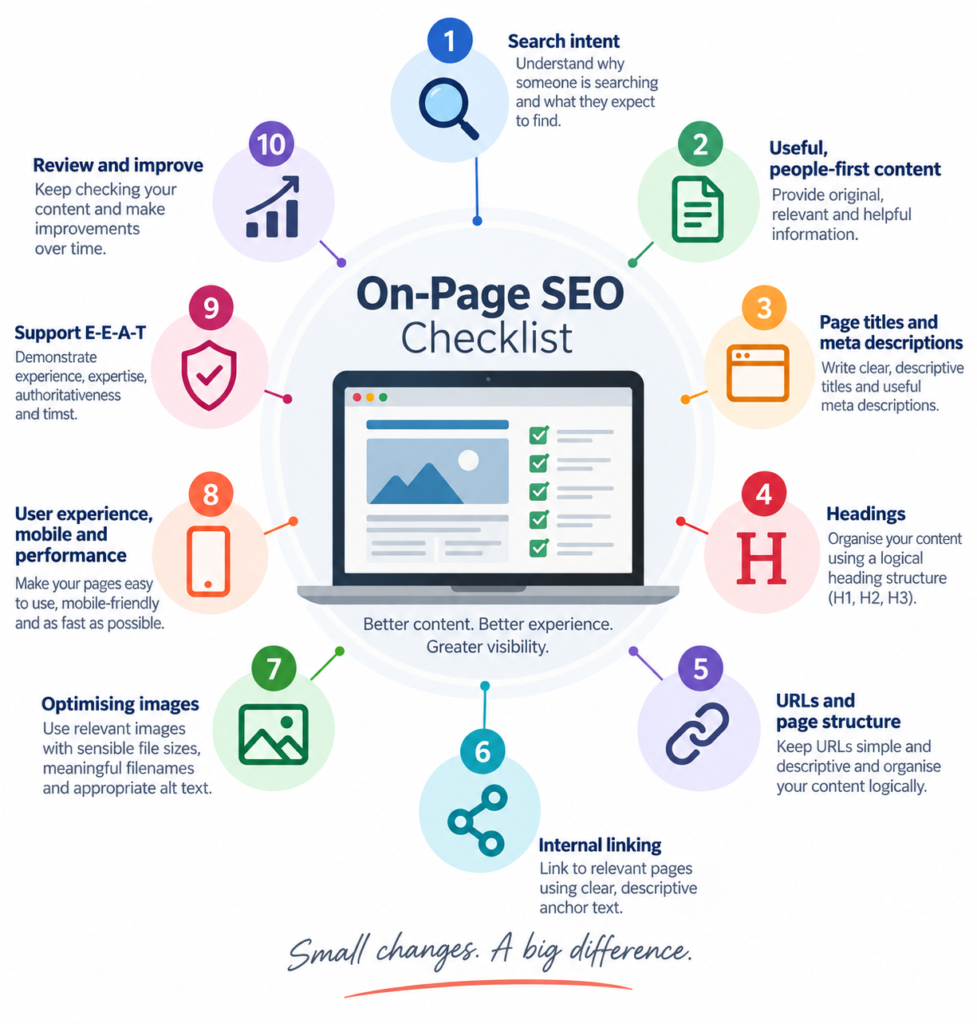
This checklist brings together the main on-page SEO elements covered in this guide. It can help you review existing pages or make sure you are considering the right points when creating new content.
Not every item will be relevant to every page, but working through the checklist can highlight areas for improvement and help ensure you are giving each page the best possible foundation.
- Search intent — Understand why someone is searching and what they expect to find.
- Useful, people-first content — Provide original, relevant and helpful information.
- Page titles and meta descriptions — Write clear, descriptive titles and useful meta descriptions.
- Headings — Organise your content using a logical heading structure.
- URLs and page structure — Keep URLs simple and descriptive and organise pages logically.
- Internal linking — Link to relevant pages using clear, descriptive anchor text.
- Images — Use relevant, appropriately sized images with meaningful filenames and alt text where required.
- User experience, mobile and performance — Make pages easy to use, mobile-friendly and reasonably fast.
- E-E-A-T — Demonstrate appropriate experience, expertise, authoritativeness and trust.
- Review and improve — Keep checking your content and improve it as circumstances change.
Use the checklist as a practical reference rather than a rigid set of rules. Working through these points will not guarantee higher rankings, but it will help you create pages that are clearer, more useful and better aligned with what visitors and search engines are looking for.
On-Page SEO Is an Ongoing Process
On-page SEO should not be treated as something you complete once and then forget about. Websites change, businesses develop, customer needs evolve and the information people search for can change over time.
An article that was accurate and useful several years ago may now contain outdated information. A service page may no longer reflect exactly what the business provides, while new questions from customers might reveal information that would make an existing page more useful.
This is why periodically reviewing your most important pages is worthwhile. Check that the information remains accurate, links still work, images are appropriate and the page continues to satisfy the needs of the people it was created for.
Search performance can also provide useful clues. Google Search Console can show the searches for which a page is appearing, whether its visibility is changing and which pages are attracting clicks. Website analytics can help you understand how visitors are finding and using your content.
Not every change in performance means that a page needs rewriting. Avoid making changes simply for the sake of appearing fresh. Instead, look for genuine opportunities to improve the usefulness, clarity or accuracy of the content.
Sometimes the best improvement may be adding useful information. At other times it could mean removing outdated material, combining several overlapping pages into one stronger resource or improving the way related pages link to one another.
On-page SEO is therefore best viewed as a process of continuous improvement: create useful pages, monitor how they perform, keep them accurate and make worthwhile changes when there is a genuine reason to do so.
Conclusion
On-page SEO is ultimately about making individual pages as useful, understandable and accessible as possible for both visitors and search engines.
That involves more than adding keywords or adjusting a few technical elements. Effective on-page optimisation begins with understanding why someone is searching and creating content that genuinely meets that need. Page titles, headings, URLs, internal links, images and page structure then help organise and communicate that information clearly.
User experience matters too. Pages need to work effectively across different devices, load efficiently and make it straightforward for visitors to find the information they need and decide what to do next.
The same principles support the wider credibility of your website. Demonstrating genuine experience and expertise, providing accurate information and making it clear who is behind the content all contribute to building trust with the people who find your pages.
You do not need to optimise everything at once. Start with the pages that are most important to your business, review them against the principles in this guide and concentrate on improvements that will genuinely benefit your visitors.
Good on-page SEO is not about creating pages for search engines. It is about creating better pages for people and making sure search engines have the information they need to understand and present them appropriately.
Want to Improve Your Website’s Search Visibility?
Good on-page SEO starts with understanding what your visitors need and making sure your website provides clear, useful and trustworthy information.
Use the checklist in this guide to review your most important pages and identify practical improvements you can make. Small changes to content, structure, internal linking, images and usability can add up to a stronger website over time.
For more practical advice on SEO, websites, search visibility and digital strategy, explore our latest articles or subscribe to the Digital Strategy newsletter for future articles, checklists and downloadable resources.
If you would prefer an independent view of your website, Digital Direction provides practical SEO and digital consultancy to help small businesses understand what is working, identify areas for improvement and decide where to focus next.