
UX and SEO: Creating Better Websites for People and Search
Introduction
A successful website needs to do more than attract visitors from search engines. Once people arrive, they need to understand where they are, find what they are looking for and complete the task that brought them to the site.
This is where user experience and search engine optimisation come together.
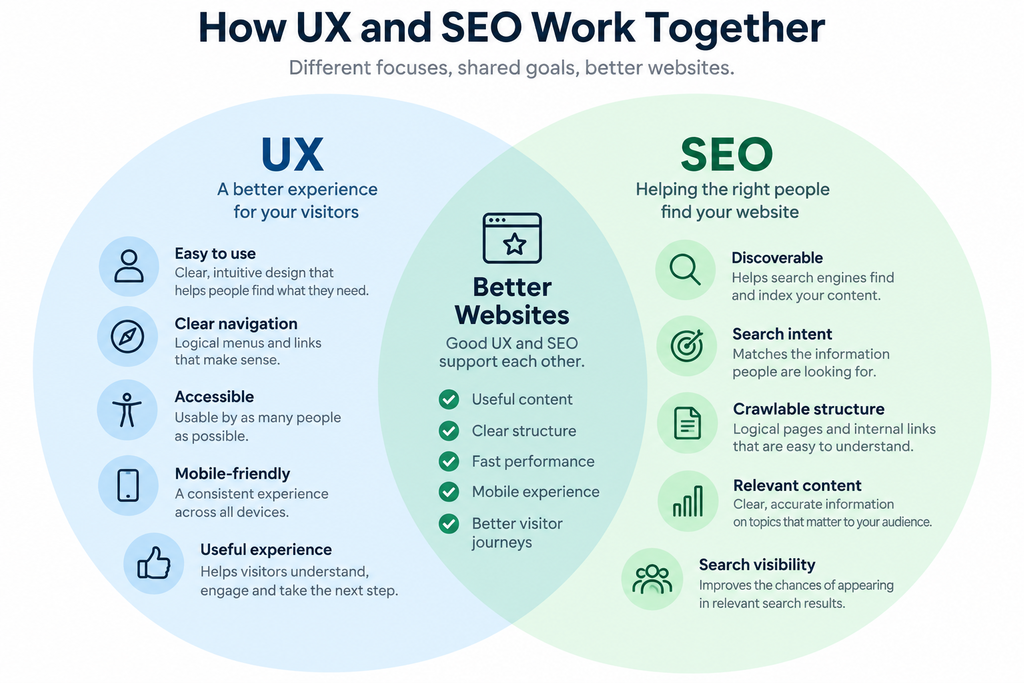
User experience (UX) focuses on making a website clear, useful and easy to use. SEO helps search engines understand your website and helps relevant people discover it through search. Although they are different disciplines, many of the things that create a better experience for visitors also contribute to a stronger, more effective website.
Clear navigation, useful content, logical page structures, mobile-friendly design, good performance and accessibility all help people use a website successfully. They also make it easier for search engines to discover, understand and present your content appropriately.
The objective should therefore not be to design a website for search engines at the expense of its users. Nor should SEO be something added after a website has been designed.
The strongest approach is to consider people and search together, creating a website that can be found by the right audience and provides a good experience when they arrive.
What Is User Experience?
User experience describes what it is like for someone to interact with your website. It covers far more than how the site looks. It includes how easily visitors can navigate, understand the content, find information and complete the task that brought them there.
A good user experience should feel straightforward. Visitors should not have to work out where to click, search unnecessarily for important information or struggle to use the website on a phone or tablet.
UX can therefore involve many different aspects of a website, including its structure, navigation, content, readability, accessibility, page speed, mobile experience and the clarity of forms and calls to action.
Good design supports all of these elements, but visual appearance alone does not create a good experience. A website can look impressive and still be frustrating to use.
The starting point for effective UX is understanding what visitors are trying to achieve and making it as easy as possible for them to do it.
How UX and SEO Work Together
UX and SEO approach a website from different perspectives, but they ultimately share an important objective: helping people find useful information and achieve what they came to the website to do.
SEO helps connect your pages with people searching for relevant information, products or services. UX then influences how easily those visitors can understand and use what they find.
For example, a page may be well optimised for a relevant search but still perform poorly for the business if visitors arrive and cannot quickly find the information they expected. Equally, an exceptionally well-designed page provides little value if the people who need it cannot discover it.
There is considerable overlap between the two disciplines. Clear page structures help visitors navigate while also helping search engines understand relationships between content. Descriptive headings make pages easier to scan while providing useful context about the subject. Fast, mobile-friendly pages improve the experience for visitors and also support good technical SEO.
The most effective websites therefore avoid treating UX and SEO as separate activities. Search should bring the right people to the right page, while good user experience should help them take the next step once they arrive.
Make It Easy for Visitors to Find What They Need
When someone arrives on your website, they should be able to understand quickly where they are and how to find the information they need.
Clear navigation is an important part of this. Menus should use meaningful labels, important pages should be easy to reach and visitors should not have to guess where a link will take them. A logical website structure also helps people understand how individual pages and subjects relate to one another.
Internal links can support this journey by directing visitors towards useful related information. They can also help search engines discover pages and understand the relationships between different areas of your website.
The same principle applies within individual pages. Clear headings, short sections and a logical flow make content easier to scan, particularly for visitors who are looking for a specific piece of information rather than reading every word.
Calls to action should also make the next step clear. Whether you want someone to contact you, request a quotation, download a guide or read another article, the visitor should not have to search for what to do next.
Good UX removes unnecessary obstacles. The easier it is for visitors to find what they need and move naturally through your website, the more useful the site becomes for both your audience and your business.
Create Clear, Useful and Well-Structured Content
Good user experience depends heavily on the quality and structure of your content. Visitors should be able to understand what a page is about, find the information they need and decide what to do next without unnecessary effort.
Start by considering why someone would visit the page. What question are they trying to answer? What problem are they trying to solve? What information would help them make a decision? Content built around these needs is more useful to visitors and better aligned with the intent behind relevant searches.
Page structure also matters. A clear page title followed by descriptive headings and logically organised sections makes longer content easier to navigate. Short paragraphs, lists where appropriate and plain language can make information easier to absorb, particularly on smaller screens.
This structure also helps search engines understand the main subject of a page and how its different sections relate to that subject.
Avoid adding content simply because you believe a page needs more words for SEO. Length alone does not make a page useful. A concise page that answers a visitor’s question clearly can provide a better experience than a long page filled with repetitive or unnecessary information.
The aim is to create content for people first while making its purpose and structure clear enough for search engines to understand.
Mobile Experience Matters
For many visitors, their first experience of your business website will be on a smartphone. A site that works well on a desktop computer but becomes difficult to use on a smaller screen can quickly create frustration.
Mobile-friendly design involves more than simply making a page fit the width of the screen. Text should remain easy to read, navigation should be straightforward, buttons and links should be easy to tap, forms should be practical to complete, and important information should not be hidden or difficult to reach.
Content also needs to work effectively on smaller screens. Long blocks of text can become particularly difficult to read, while clear headings, shorter paragraphs and sensible spacing make pages easier to scan and understand.
A good mobile experience also supports SEO. Google predominantly uses the mobile version of a site’s content for indexing and ranking, making it important that mobile visitors receive the same useful content and information available on the desktop version.
The objective is not to create a separate experience for mobile users, but to make sure your website remains clear, useful and easy to operate regardless of the device being used.
Website Speed and Core Web Vitals
A slow or unstable website can quickly undermine an otherwise good user experience. Visitors expect pages to load promptly, respond when they interact with them and remain visually stable while they are being used.
This is where website performance and Google’s Core Web Vitals become relevant.
Core Web Vitals are a set of measurements designed to assess important aspects of the experience people have when using a web page. They currently focus on three areas: how quickly the main content becomes visible, how responsive the page is when someone interacts with it, and how visually stable the page remains while loading.
Performance problems can have very practical consequences. Large unoptimised images can delay important content, unnecessary scripts can make a page slow to respond, and elements that move unexpectedly while loading can cause visitors to click the wrong link or button.
Page experience is also one of the considerations Google takes into account when assessing search results, although Core Web Vitals should not be viewed as a shortcut to higher rankings. Improving a poor-performing website is primarily about providing visitors with a faster, more reliable and less frustrating experience.
For most businesses, the objective should be straightforward: pages should load efficiently, respond quickly and remain stable while visitors use them.
Accessibility Is Part of Good User Experience
A good website should be usable by as many people as possible, including visitors with visual, hearing, motor or cognitive impairments.
Accessibility therefore needs to be considered as part of user experience rather than treated as a separate technical exercise.
Many accessibility improvements benefit everyone. Clear headings make content easier to navigate. Good colour contrast improves readability. Descriptive link text helps people understand where a link will take them. Alternative text can communicate the purpose of meaningful images, while properly labelled forms make it clearer what information is required.
Keyboard navigation is also important. Visitors who cannot use a mouse should still be able to move through menus, links, forms and other interactive elements in a logical way.
Accessibility and SEO also share some good practices. Logical page structures, descriptive headings, meaningful links and understandable content can make pages easier for both people and search engines to interpret.
Accessibility should not be implemented simply because it might help SEO, however. Its primary purpose is to remove unnecessary barriers and make your website usable by a wider range of people.
Designing with accessibility in mind from the beginning generally produces a clearer, more usable website for everyone.
Avoid Designing for Search Engines Instead of People
SEO is important, but problems arise when pages are created primarily to satisfy what a business thinks search engines want rather than to help the people actually using the website.
This can result in repetitive keywords, unnecessary text, awkward headings, excessive internal links or pages created for slightly different search phrases despite offering essentially the same information. These approaches can make a website confusing and frustrating to use.
A better starting point is the visitor.
Consider what someone searching for the page is trying to achieve and provide the information they need in a clear and useful way. Keywords can still help establish the subject of a page, while headings, internal links and other SEO techniques can help organise and connect the content. They should support the experience rather than dictate it.
The same principle applies to design. Pop-ups, intrusive advertising, confusing navigation or calls to action competing for attention may serve a short-term marketing objective but can make it harder for visitors to accomplish what they came to do.
Search engines increasingly emphasise useful, people-first content. That makes good UX and good SEO complementary rather than competing objectives.
Design for the needs of your visitors first, then use SEO to help the right people discover the experience you have created.
How Good UX Can Support Search Performance
Good user experience does not replace SEO, and individual measures such as bounce rate or time spent on a page should not be treated as simple ranking factors. The relationship between UX and search performance is broader than that.
A well-designed website makes it easier for people to find, understand and use its content. Clear navigation and internal linking help visitors move between related pages, while logical site structures also help search engines discover and understand your content.
Useful, well-organised pages are also more likely to satisfy the reason someone searched in the first place. If visitors can quickly confirm that they have reached the right page, understand the information and take an appropriate next step, the website is doing its job effectively.
Mobile usability, accessibility and good performance reinforce that experience by removing barriers that might otherwise prevent people from using the site successfully.
There can also be indirect benefits. Content that is genuinely useful and easy to consume has a better chance of being shared, recommended, referenced or linked to by other websites, helping to build the wider authority and reputation that supports SEO over time.
The important point is that UX should not be treated as a collection of tricks for improving rankings. Its value comes from creating a better website for visitors. When strong UX is combined with sound SEO, the result is a website that is easier to discover and more effective when people arrive.
A Practical UX and SEO Checklist
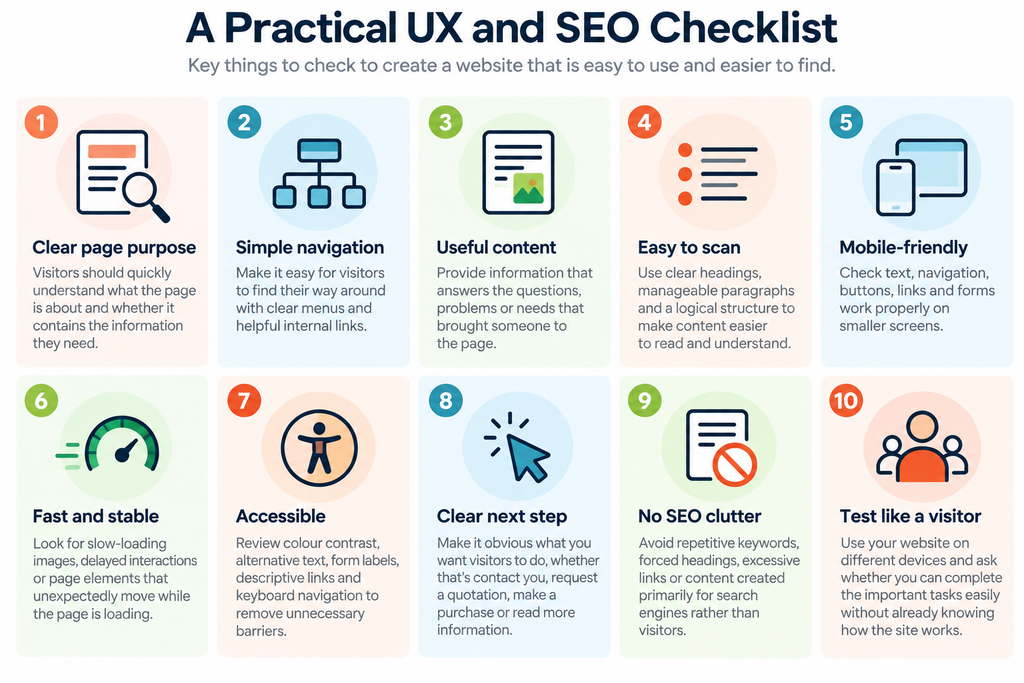
You don’t need to redesign your entire website to improve user experience and SEO. Start with your most important pages and review them from the perspective of someone visiting for the first time.
- Is the purpose of the page immediately clear?
Visitors should quickly understand what the page is about and whether it contains the information they need. - Can visitors easily find their way around?
Check that navigation is clear, important pages are easy to reach, and internal links help people discover relevant information. - Does the content answer what visitors are looking for?
Focus on useful information that addresses the questions, problems or needs that brought someone to the page. - Is the content easy to read and scan?
Use descriptive headings, manageable paragraphs and a logical structure to make information easier to understand. - Does the page work properly on mobile devices?
Check text, navigation, buttons, links, forms and other interactive elements on smaller screens. - Does the page load quickly and respond smoothly?
Look for slow-loading images, delayed interactions or page elements that unexpectedly move while the page is loading. - Is the page accessible?
Review colour contrast, alternative text, form labels, descriptive links and keyboard navigation to identify unnecessary barriers. - Is the next step obvious?
Whether you want visitors to contact you, request a quotation, make a purchase or read more information, make the appropriate next action clear. - Have you avoided unnecessary SEO clutter?
Remove repetitive keywords, forced headings, excessive links or content that exists primarily for search engines rather than visitors. - Have you tested the page as a real visitor would?
Use the website yourself on different devices and ask whether you can complete the important tasks easily without already knowing how the site works.
The objective isn’t to optimise individual elements in isolation. Look at the complete journey from finding your page in search through to successfully completing the visitor’s intended task.
UX and SEO Are an Ongoing Process
Websites rarely remain static. Content changes, new pages are added, services evolve, and the expectations of visitors change over time. Search engines, browsers and the devices people use also continue to develop.
This means that UX and SEO should not be treated as tasks that are completed when a website is launched or redesigned.
Regularly reviewing important pages can reveal problems that were not obvious when they were first created. Links may no longer lead to the most useful information, navigation can become more complicated as a site grows, content can become outdated, and changes to images, plugins or scripts can affect performance.
Visitor behaviour and search data can also provide useful clues. Analytics may show where people enter and leave the site, which pages attract attention and how visitors move between content. Search performance data can help identify the queries and pages bringing people to the website.
These insights should be used as starting points for investigation rather than viewed in isolation. If an important page is underperforming, look at the page itself, test the experience and consider whether its content still meets the needs of the people arriving there.
Small, informed improvements made regularly can be more effective than waiting several years for the next major website redesign. Good UX and effective SEO both depend on continuing to understand your audience, reviewing what is working and improving what isn’t.
Conclusion
UX and SEO work best when they are considered together rather than as separate activities.
SEO helps the right people discover your website, while good user experience helps those visitors find information, understand your content and complete the tasks that brought them there.
Many of the principles that support one also strengthen the other. Clear navigation, useful and well-structured content, mobile-friendly design, good performance and accessibility all contribute to a website that is easier to use and easier to understand.
The goal is not to design for search engines and then accommodate visitors afterwards. It is to create useful, accessible and effective experiences for people while making sure search engines can discover and understand the content you provide.
When UX and SEO support each other, your website has a better opportunity not only to attract relevant visitors, but to turn that visibility into meaningful results for your business.
Want to Improve the Experience Your Website Provides?
Bringing people to your website is only part of the challenge. Once they arrive, the site needs to make it easy for them to find what they need, understand what you offer and take the next step.
Reviewing your website from both a UX and SEO perspective can uncover problems that are easily overlooked when you work with the site every day. Navigation, content structure, mobile usability, accessibility and performance can all affect how effectively your website works for visitors.
Start by reviewing a few of your most important pages using the checklist above. Look at them as a first-time visitor rather than as someone who already knows where everything is.
If you would like an independent view, Digital Direction can review your website and help identify practical improvements that could make it easier to use, easier to find and more effective for your business.