
Core Web Vitals Explained
Introduction
A fast, responsive and stable website provides a better experience for visitors. Pages that take too long to load, respond slowly when someone clicks or taps, or unexpectedly move while being used can quickly become frustrating.
Core Web Vitals are a set of measurements developed by Google to help assess these important aspects of website experience.
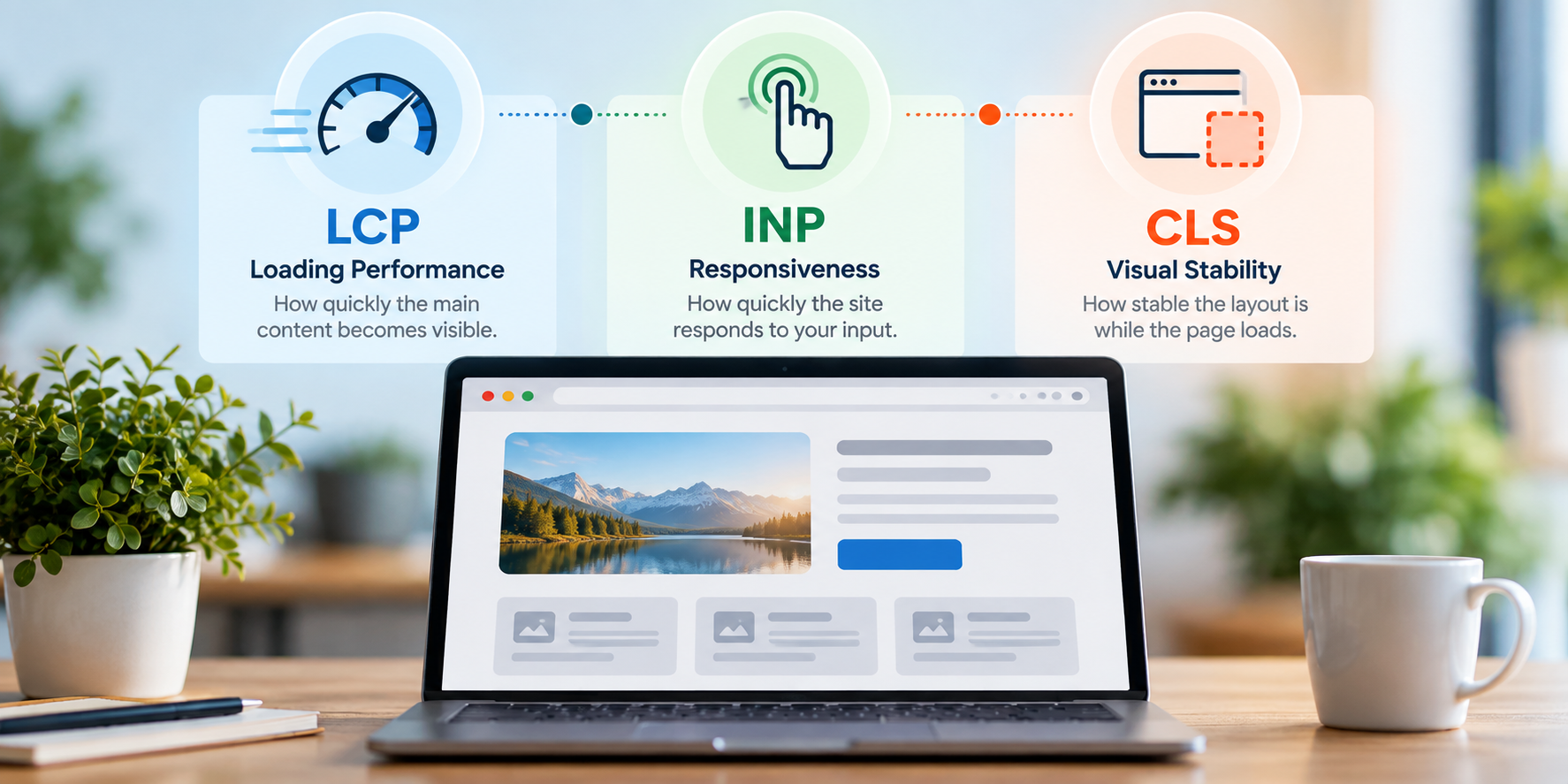
Rather than attempting to measure every aspect of a website, Core Web Vitals concentrate on three specific areas: how quickly the main content loads, how responsive the page is to user interaction and how visually stable the layout remains.
These are measured using three metrics: Largest Contentful Paint (LCP), Interaction to Next Paint (INP) and Cumulative Layout Shift (CLS).
Core Web Vitals are relevant to SEO, but they should not be viewed simply as numbers that need to be improved for search engines. Their real value is that they can help identify performance problems that affect the people using your website.
In this guide, we’ll look at what each Core Web Vital measures, what constitutes a good result, how you can test your website and some practical ways to improve its performance and user experience.
What Are Core Web Vitals?
Core Web Vitals are a set of performance measurements created by Google to assess specific aspects of the experience people have when using a web page.
They focus on three areas that can have a noticeable impact on visitors:
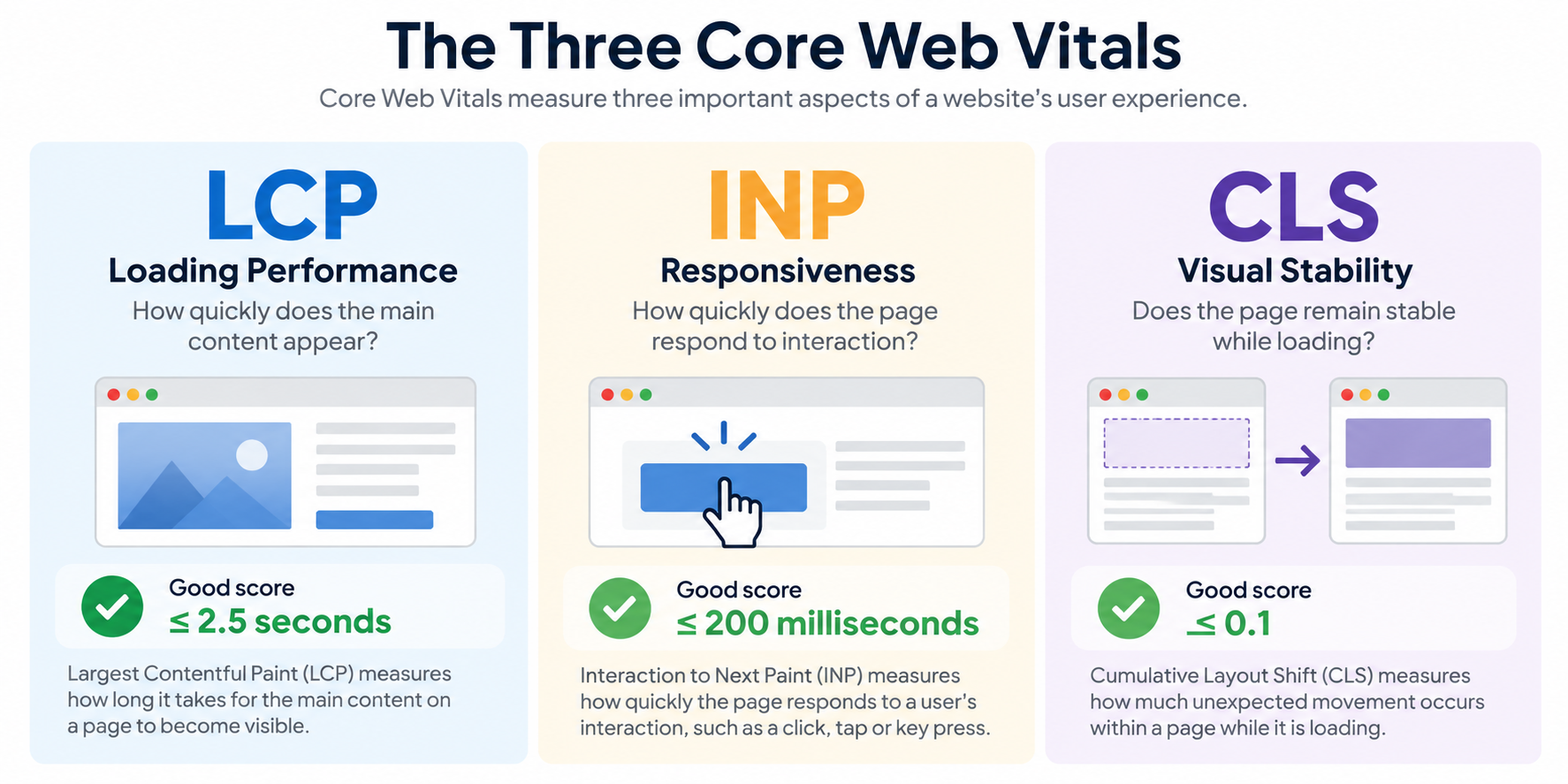
- Largest Contentful Paint (LCP) measures loading performance — how quickly the main content of the page becomes visible.
- Interaction to Next Paint (INP) measures responsiveness — how quickly the page responds when someone interacts with it.
- Cumulative Layout Shift (CLS) measures visual stability — whether elements unexpectedly move around while the page is being used.
Together, these metrics provide a useful indication of whether a page loads promptly, responds effectively and remains visually stable.
Core Web Vitals are measured using real-world performance data where sufficient data is available, which means the experience of actual visitors can be taken into account rather than relying solely on a one-off laboratory test.
Each metric has recommended thresholds that allow performance to be classified as good, needing improvement or poor. However, the objective should not simply be to achieve three favourable scores.
The measurements are most useful when they help identify genuine problems affecting visitors. Understanding what each metric represents is therefore more valuable than concentrating on the numbers alone.
Largest Contentful Paint (LCP): Loading Performance
Largest Contentful Paint measures how quickly the main content of a page becomes visible to the visitor.
In practical terms, LCP looks at the largest significant content element visible within the browser window as the page loads. This will often be a large image, banner, heading or substantial block of text.
Google considers an LCP of 2.5 seconds or less to provide a good experience. Between 2.5 and 4 seconds is considered to need improvement, while anything above 4 seconds is classified as poor.
A slow LCP can leave visitors looking at an incomplete page while they wait for the content they actually came to see. This can be particularly noticeable on mobile devices or slower connections.
Several factors can contribute to poor LCP performance. Large or poorly optimised images are common causes, but slow server response times, unnecessary scripts, inefficient CSS and delays in loading important resources can also affect how quickly the main content appears.
Improving LCP therefore involves identifying which element is being measured and understanding what is preventing it from appearing sooner.
The objective isn’t simply to achieve a particular score. It is to make sure visitors can see and begin using the important content of your page without unnecessary delay.
Interaction to Next Paint (INP): Responsiveness
Interaction to Next Paint measures how quickly a page responds when someone interacts with it.
An interaction might involve clicking a button, selecting an item from a menu, opening an accordion or tapping a control on a mobile device. INP looks at the delay between that interaction and the page providing a visible response.
Google considers an INP of 200 milliseconds or less to provide a good experience. Between 200 and 500 milliseconds needs improvement, while anything above 500 milliseconds is considered poor.
A responsive website feels immediate. When someone clicks or taps something, they receive visual feedback quickly. When responsiveness is poor, the page can appear to ignore the visitor, even though it may eventually complete the requested action.
Heavy JavaScript, complex scripts and too much processing on the browser’s main thread are common causes of poor responsiveness. Third-party tools such as advertising, analytics, chat widgets and other embedded services can also contribute.
INP replaced First Input Delay (FID) as a Core Web Vital because it provides a broader measure of responsiveness throughout a visitor’s time on a page rather than concentrating only on their first interaction.
Improving INP is ultimately about reducing the delay between what a visitor does and what they see happen as a result, helping the website feel faster and more responsive to use.
Cumulative Layout Shift (CLS): Visual Stability
Cumulative Layout Shift measures how visually stable a page remains while someone is using it.
Unexpected movement can occur when content loads or changes position after the page has already begun to display. An image might suddenly push text further down the page, an advertisement could appear above the content, or a button might move just as someone is about to click it.
CLS measures these unexpected layout shifts and produces a score based on how much visible content moves and how significant that movement is.
Google considers a CLS score of 0.1 or less to provide a good experience. Between 0.1 and 0.25 needs improvement, while anything above 0.25 is considered poor.
Common causes include images and videos without defined dimensions, advertisements or embedded content that do not have space reserved for them, dynamically inserted content and some approaches to loading web fonts.
Visual instability can be particularly frustrating because it may cause visitors to lose their place or accidentally select the wrong link or button.
Improving CLS is therefore about making page behaviour more predictable. Reserving sufficient space for images, videos and other content before they load can help ensure that the page visitors initially see remains stable as the remaining elements appear.
What Are Good Core Web Vitals Scores?
Google provides recommended thresholds for each of the three Core Web Vitals. These give you a useful benchmark for understanding whether visitors are receiving a good experience or whether further investigation may be needed.
| Core Web Vital | Good | Needs Improvement | Poor |
|---|---|---|---|
| Largest Contentful Paint (LCP) | 2.5 seconds or less | 2.5–4 seconds | More than 4 seconds |
| Interaction to Next Paint (INP) | 200 milliseconds or less | 200–500 milliseconds | More than 500 milliseconds |
| Cumulative Layout Shift (CLS) | 0.1 or less | 0.1–0.25 | More than 0.25 |
When assessing Core Web Vitals using real-world user data, Google evaluates performance at the 75th percentile of page visits. This helps ensure that a good result represents the experience received by most visitors rather than being based only on the fastest connections or devices.
The three measurements should also be considered separately. A page might load quickly but respond slowly to interaction, or it could perform well for loading and responsiveness while suffering from unexpected layout movement.
This is why a single overall performance score can sometimes hide useful information.
The thresholds provide useful targets, but they should not become the sole objective. Core Web Vitals are most valuable when you use them to identify where real visitors may be experiencing performance problems and then investigate what is causing them.
Why Core Web Vitals Matter for User Experience
Core Web Vitals matter because they measure performance problems that visitors can actually experience while using a website.
A page may look attractive and contain excellent content, but that experience can quickly deteriorate if the main information takes too long to appear, buttons respond slowly, or content unexpectedly moves around the screen.
Each Core Web Vital therefore reflects a different part of the visitor’s experience.
LCP relates to how quickly people can see the main content they came for. INP reflects how responsive the website feels when they interact with it. CLS measures whether the page remains visually stable and predictable while they use it.
Poor performance can be particularly noticeable on mobile devices, slower connections and less powerful hardware. A website that appears fast on the computer and broadband connection used by its owner or developer may provide a very different experience for some of its customers.
This is why real-world performance data is valuable. It can reveal problems that are difficult to identify when testing a website under ideal conditions.
Core Web Vitals do not measure every aspect of user experience. They cannot tell you whether your navigation makes sense, your content is useful, or your forms are easy to complete. But they provide useful measurements of three fundamental aspects of page performance.
Used alongside broader UX testing, they can help identify technical barriers that make an otherwise useful website unnecessarily difficult or frustrating to use.
How Core Web Vitals Relate to SEO
Core Web Vitals are relevant to SEO, but their role should be kept in perspective.
Google uses Core Web Vitals as part of its broader consideration of page experience. However, achieving excellent Core Web Vitals scores does not automatically result in higher rankings, and a page with useful, relevant content can still perform well in search even if its performance scores are not perfect.
Content relevance and quality remain fundamental. Core Web Vitals should therefore not be treated as a shortcut to improving search rankings.
Where they become particularly useful is in identifying technical problems that may be making your website unnecessarily difficult or frustrating to use. If two pages provide similarly useful information, providing visitors with a faster, more responsive and stable experience is clearly preferable.
Performance can also affect the effectiveness of the traffic SEO generates. There is little benefit in attracting someone from a search result if they then encounter a slow-loading page, unresponsive controls or content that moves unexpectedly while they are trying to use it.
The most useful approach is therefore to consider Core Web Vitals as part of a wider SEO and user experience strategy rather than as an isolated ranking exercise.
Optimise them because they help you provide a better website experience. Any contribution they make to search performance should be viewed within that broader objective.
What Causes Poor Core Web Vitals?
Poor Core Web Vitals are rarely caused by a single issue. They can result from a combination of hosting, website design, images, scripts, fonts and third-party services.
Large, unoptimised images are a common cause of poor LCP. If the main image or other important content requires a large download, visitors may have to wait longer before the page appears complete. Slow server response times and resources that delay rendering can add to the problem.
Poor INP is often associated with too much work taking place in the visitor’s browser. Large or complex JavaScript files, plugins and third-party services can occupy the browser’s main thread, delaying its ability to respond when someone clicks, taps or types.
CLS problems occur when the browser does not know how much space an element will require before it loads. Images or videos without defined dimensions, advertisements, embedded content, web fonts and dynamically inserted elements can all cause existing content to move unexpectedly.
Some common causes affect more than one metric. These include:
- oversized or poorly optimised images;
- excessive JavaScript and CSS;
- too many plugins or third-party scripts;
- slow hosting or server response;
- inefficiently loaded web fonts;
- advertisements, embeds or other dynamically loaded content; and
- poorly configured caching and content delivery.
It is important not to start removing or changing things simply because a performance-testing tool produces a long list of recommendations. First, identify which Core Web Vital is performing poorly and what is actually causing the problem.
That diagnosis makes it much easier to concentrate on changes that will produce a meaningful improvement for visitors.
How to Improve Core Web Vitals
Once you have identified which Core Web Vital is causing a problem, you can concentrate on improvements that address the underlying cause rather than trying to optimise everything at once.
Optimise Images
Images are often among the largest resources on a page. Resize them appropriately, compress them and use efficient modern image formats where practical. Pay particular attention to large images near the top of the page, as these are often responsible for LCP.
Improve Server and Hosting Performance
A slow server can delay everything that follows. Appropriate hosting, effective caching and, where useful, a Content Delivery Network (CDN) can reduce the time visitors wait for page resources to begin loading.
Reduce Unnecessary JavaScript
JavaScript can add valuable functionality, but excessive or inefficient scripts can make pages slow to respond. Remove scripts that are no longer required and review plugins, tracking tools, chat systems and other third-party services that add JavaScript to your pages.
Load Resources Efficiently
CSS, JavaScript, fonts and other resources should be loaded in a way that avoids unnecessarily delaying important content. Prioritising the resources required for the initial page view can help visitors see and use the page sooner.
Prevent Unexpected Layout Movement
Specify dimensions or reserve appropriate space for images, videos, advertisements and embedded content. This allows the browser to create the page layout before those elements have completely loaded and can significantly reduce CLS.
Review Web Fonts
Custom fonts can affect both loading performance and visual stability. Use only the font files and weights you actually need and configure them carefully so that text remains visible and layout changes are minimised while fonts load.
Be Selective About Third-Party Services
Analytics, advertising, social media embeds, cookie tools, chat widgets and other external services can all add processing and network requests. Review whether each service provides enough value to justify its effect on performance.
Core Web Vitals optimisation is usually most effective when approached methodically. Measure the problem, identify its cause, make a targeted change and test again.
The objective is not to remove useful functionality simply to achieve a perfect score. It is to find an appropriate balance between the features your website needs and the performance experience you provide to visitors.
How to Measure Your Core Web Vitals
There are several tools available for measuring Core Web Vitals, and it is useful to understand the difference between real-world data and tests carried out under controlled conditions.
PageSpeed Insights
Google’s PageSpeed Insights is a useful starting point. Enter the URL of a page, and it can show Core Web Vitals data collected from real users where sufficient information is available, alongside a laboratory test and recommendations for potential improvements.
This allows you to see both how visitors have experienced the page and identify technical issues that may be contributing to poor performance.
Google Search Console
The Core Web Vitals report in Google Search Console provides a broader view across your website. It groups pages with similar performance characteristics and identifies URLs considered good, needing improvement or poor.
This is particularly useful for identifying whether a problem affects an individual page or a larger group of pages using the same template or functionality.
Chrome DevTools and Lighthouse
Chrome’s developer tools and Lighthouse can provide more detailed diagnostic information. They allow developers to test pages, investigate performance problems and identify resources or processes that may be contributing to poor results.
Real-World Data and Laboratory Tests
It is important to distinguish between the two types of measurement.
Real-world, or field, data reflects experiences collected from actual Chrome users over time. Laboratory testing measures a page under a controlled set of conditions at a particular moment.
The results may therefore differ, and this does not necessarily mean that either is wrong. A laboratory test is useful for diagnosing problems and testing changes, while field data helps you understand what visitors have actually experienced.
Whichever tools you use, avoid concentrating on a single test result. Look for patterns, identify which metric is causing difficulty and use the diagnostic information to investigate the underlying cause.
Measure first, make targeted improvements and then measure again to see whether those changes have produced a meaningful improvement.
A Practical Core Web Vitals Checklist
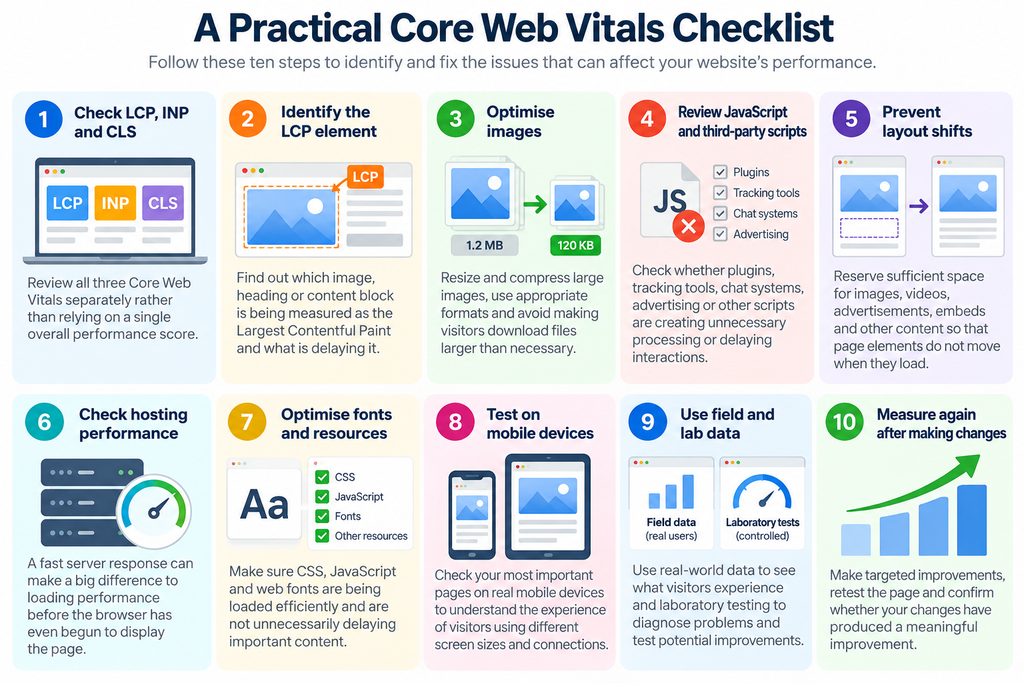
You don’t need to optimise every aspect of your website at once. Start with your most important pages, measure their current performance and concentrate on the issues that have the greatest effect on visitors.
- Check all three Core Web Vitals
Review LCP, INP and CLS separately rather than relying on a single overall performance score. - Identify your LCP element
Find out which image, heading or content block is being measured as the Largest Contentful Paint and investigate what is delaying it. - Optimise important images
Resize and compress large images, use appropriate formats and avoid making visitors download files considerably larger than necessary. - Review JavaScript and third-party scripts
Check whether plugins, tracking tools, chat systems, advertising or other scripts are creating unnecessary processing or delaying interactions. - Prevent unexpected layout shifts
Reserve sufficient space for images, videos, advertisements, embeds and other content so that existing page elements do not move when they load. - Check server and hosting performance
Slow server responses can affect loading performance before the browser has even begun displaying the page. - Review fonts and other page resources
Make sure CSS, JavaScript and web fonts are being loaded efficiently and are not unnecessarily delaying important content. - Test important pages on mobile devices
Don’t assume that good performance on a desktop computer and fast connection represents the experience of all your visitors. - Use both field and laboratory data
Use real-world data to understand what visitors experience and laboratory testing to investigate problems and test potential improvements. - Measure again after making changes
Performance optimisation should be an evidence-based process. Make targeted improvements, retest the page and confirm whether they have actually improved the experience.
The aim is not to achieve perfect scores at any cost. Concentrate on improvements that make your website faster, more responsive and more stable for the people who use it.
Core Web Vitals Are Part of a Bigger Picture
Core Web Vitals provide useful measurements of loading performance, responsiveness and visual stability, but they do not provide a complete assessment of your website’s user experience.
A page can achieve excellent Core Web Vitals scores and still be difficult to use. Confusing navigation, poor accessibility, unclear content, intrusive pop-ups or complicated forms can all frustrate visitors without necessarily being reflected in LCP, INP or CLS.
The reverse is also important. A website should not sacrifice useful content or functionality simply to achieve perfect performance scores.
Core Web Vitals are therefore best considered alongside other aspects of website quality, including mobile usability, accessibility, content, navigation, security and overall user experience.
They should also form part of a broader approach to SEO rather than being treated as an isolated optimisation exercise. Relevant, useful content remains essential, as do good website structure, on-page optimisation and the authority and reputation your business builds beyond its own website.
The objective is a website that works well as a whole: one that people can find, loads efficiently, responds quickly, remains stable and makes it easy for visitors to achieve what they came to do.
Core Web Vitals help us measure an important part of that experience, but they are one part of the bigger picture.
Conclusion
Core Web Vitals provide a practical way to understand three important aspects of website performance: how quickly the main content appears, how responsive the page is to interaction and how visually stable it remains while being used.
LCP, INP and CLS each measure something different, which is why it is important to understand the individual results rather than concentrating on a single performance score.
The measurements can help identify genuine problems affecting visitors, from oversized images and slow server responses to excessive JavaScript and unexpected movement within a page.
However, Core Web Vitals should not become an exercise in chasing perfect scores. Their real value lies in helping you identify and improve performance issues that make your website slower, less responsive or more frustrating to use.
Used alongside good content, accessibility, mobile usability, clear navigation and sound SEO, Core Web Vitals can contribute to a website that provides a better experience for visitors and performs more effectively for your business.
Measure what is happening, identify the problems that matter and concentrate on improvements that make a meaningful difference to the people using your website.
Want to Improve Your Website’s Performance?
Core Web Vitals can reveal performance problems that are easy to overlook when you regularly use your own website.
Slow-loading content, delayed interactions and unexpected layout movement can all affect the experience your visitors receive, particularly on mobile devices or slower connections.
A useful starting point is to test several of your most important pages using the checklist above. Look at LCP, INP and CLS individually, identify where problems occur and concentrate first on the issues most likely to affect your visitors.
Performance should also be considered alongside the wider website experience. Content, navigation, accessibility, mobile usability and SEO all contribute to how effectively your website works for potential customers.
If you would like an independent assessment, Digital Direction can review your website’s performance and wider user experience, identify areas that may be causing problems and recommend practical improvements.
Understanding where the problems are is the first step towards creating a faster, more responsive and more effective website.