
The Complete Small Business Guide to Google Business Profile
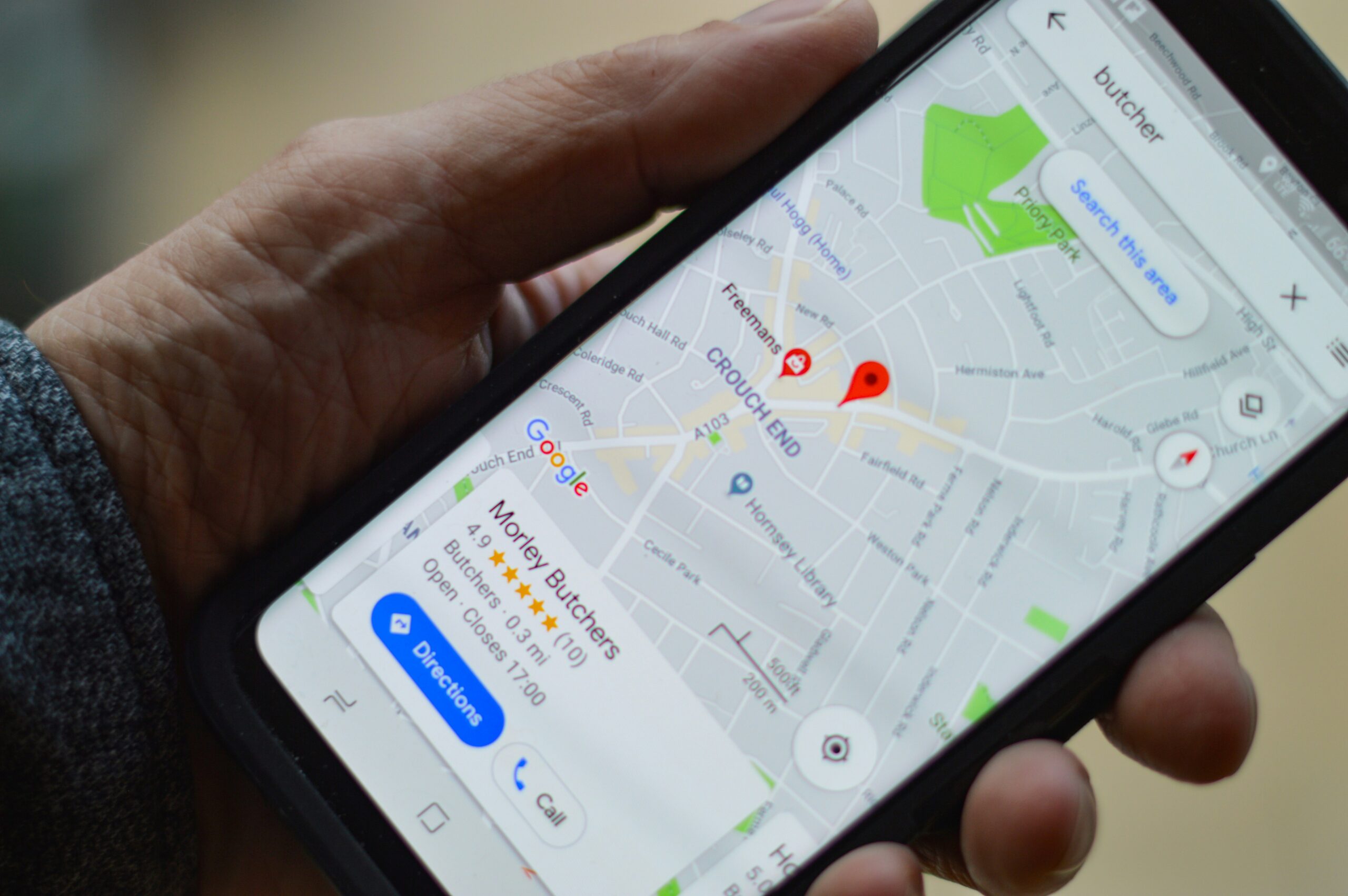
Helping your business get found by local customers
Practical advice for small business owners on improving their visibility in Google Search and Google Maps. Learn how to optimise your Google Business Profile, attract more local customers and build trust through an accurate, up-to-date business listing.
Introduction
If someone searches Google for a product or service that you offer, what do they see?
For many small businesses, the first thing a potential customer notices isn’t the company website—it’s the Google Business Profile that appears alongside the search results or on Google Maps.
That small panel contains your opening hours, contact details, customer reviews, photographs, directions, services and much more. In many cases, it forms a customer’s first impression of your business before they ever visit your website.
Yet surprisingly, many businesses either haven’t claimed their Google Business Profile or have created one and then forgotten about it. Out-of-date information, missing photographs, unanswered reviews and incomplete profiles are all common problems that reduce visibility and make businesses appear less professional than their competitors.
A well-managed Google Business Profile is one of the most effective—and completely free—marketing tools available to small businesses. It helps people discover your business, builds trust through customer reviews, improves your visibility in local searches and can generate enquiries without anyone ever visiting your website.
Whether you’re a local tradesperson, consultant, retailer, café, professional practice or service business, an optimised Google Business Profile should be a central part of your online presence.
In this guide, we’ll explain what Google Business Profile is, why it matters, how to optimise it and the practical steps you can take to improve your local visibility.
By the end of this guide, you’ll have a clear understanding of how to turn your Google Business Profile into a valu
What Is Google Business Profile?
Google Business Profile is a free service from Google that allows businesses to manage how they appear across Google Search and Google Maps. You may remember it by its previous name, Google My Business, but the purpose remains broadly the same: helping people find and learn about businesses when they search online.
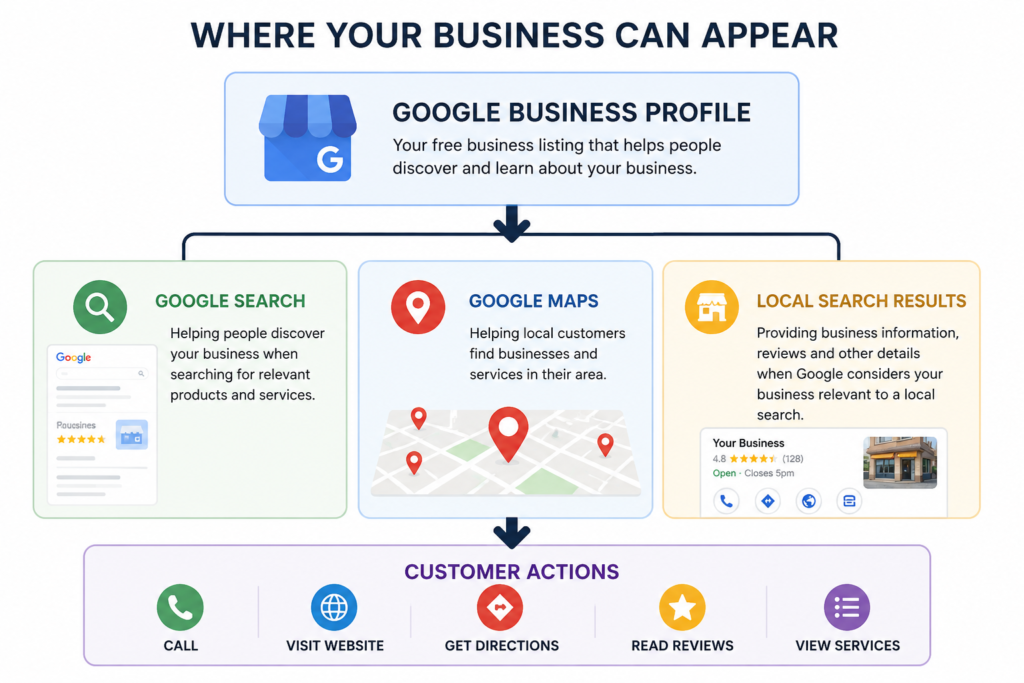
A Business Profile can display much more than your company name and telephone number. Depending on the type of business, customers may be able to see your opening hours, location or service area, website, photographs, products and services, customer reviews and other useful information. They may also be able to call you, request directions or visit your website directly from the search results.
This is particularly important for local searches. Someone looking for a plumber near me, accountant in Oxted or Italian restaurant nearby may be shown a selection of relevant businesses prominently within Google’s search results and Maps. A complete and well-maintained Business Profile gives Google more accurate information about your business and gives potential customers more information on which to base their choice.
Google Business Profile is also relevant to businesses that don’t have a traditional shop or office that customers visit. Many consultants, tradespeople and other service businesses can create a profile, define the areas they serve and choose not to display their address publicly where Google’s eligibility rules allow this.
The important point is that your Google Business Profile isn’t simply an entry in an online directory. It is part of your wider online presence and an important connection between Google, your business and potential customers searching for the services you provide locally.
Why Every Small Business Needs a Google Business Profile
Having a Google Business Profile is about more than simply making sure your business appears on Google. It gives potential customers useful information at the exact moment they are searching for a product, service or business like yours.
For a small business, this visibility can be particularly valuable. When someone carries out a local search, Google may display relevant businesses prominently within the search results and on Google Maps. A well-maintained Business Profile gives you an opportunity to appear alongside larger or more established competitors without having to pay for advertising.
Your profile also helps potential customers make decisions. Before contacting a business, people often want to know whether it looks genuine, whether other customers recommend it and whether it provides the service they need. Accurate business information, photographs, services and customer reviews can answer many of those questions before the customer ever visits your website.
This makes Google Business Profile an important part of building trust as well as visibility. A business with current opening hours, recent photographs, useful information and responses to customer reviews is likely to create a very different impression from one with an incomplete or neglected profile.
For businesses serving a particular town, region or local community, the benefits are even greater. Google Business Profile helps Google understand where your business operates and what it offers, which can help connect you with people carrying out relevant local searches.
It also provides customers with convenient ways to take the next step. Depending on your business and profile, they may be able to call you, visit your website, request directions, view your services or read reviews directly from Google Search or Maps.
Most importantly, Google Business Profile is free. For a small business with a limited marketing budget, there are few reasons not to take advantage of a tool that can improve visibility, strengthen credibility and make it easier for potential customers to get in touch.

Completing and Optimising Your Profile Correctly
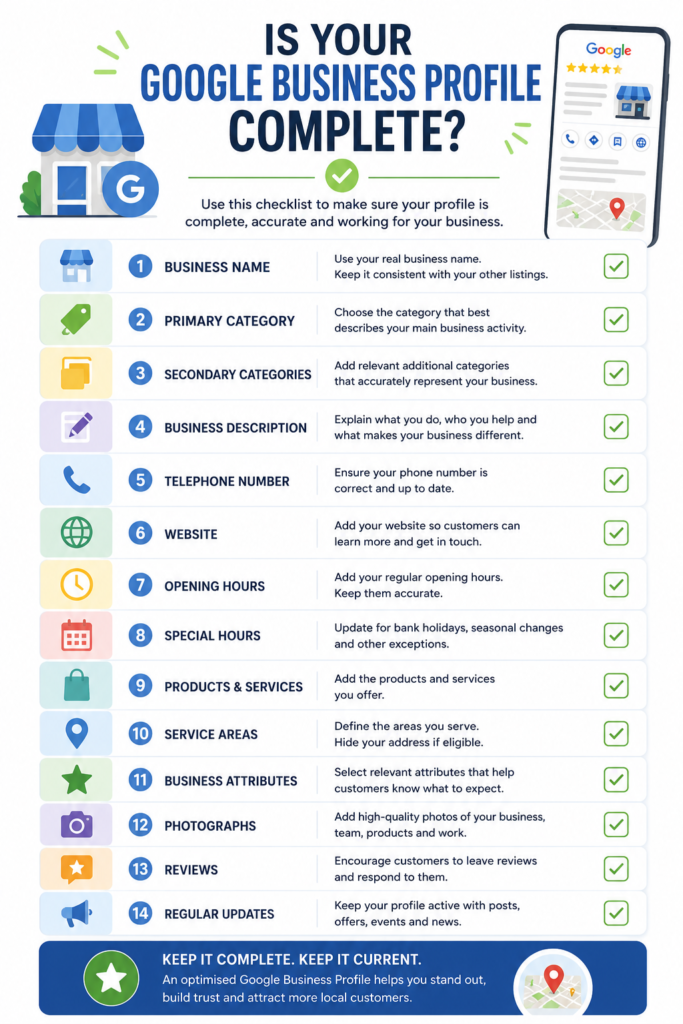
Creating a Google Business Profile is only the beginning. To get the greatest value from it, you need to provide Google and potential customers with complete, accurate and useful information about your business.
Start with the basics. Your business name should reflect the name you genuinely use rather than being filled with additional keywords in an attempt to improve your visibility. Your telephone number, website address and other contact information should also be accurate and kept up to date.
Choosing the right business category is particularly important. Your primary category should describe the main activity of your business as closely as possible. You can then add appropriate secondary categories to represent other important services you provide. Avoid selecting categories simply because they might attract additional searches—they should genuinely describe your business.
Your business description gives you an opportunity to explain what you do, who you help and what makes your business different. Write it for potential customers rather than search engines. Clear, natural language that accurately describes the business is much more useful than a paragraph packed with keywords.
You should also complete the products and services available within your profile where they are relevant. Adding individual services helps potential customers understand what you offer and gives Google additional information about your business.
Opening hours deserve particular attention. Incorrect hours can quickly frustrate customers, especially during bank holidays, Christmas and other periods when your normal schedule changes. Google allows you to set special hours, so make updating them part of your normal business routine.
For businesses that visit customers rather than serving them from a permanent public location, the service area settings are also important. These allow you to indicate the towns, cities or regions you serve without necessarily displaying an address that customers should visit.
Finally, review the business attributes available for your particular category. These can provide customers with additional useful information about facilities, accessibility, payment options and other characteristics of your business.
The aim isn’t to complete fields simply because Google provides them. It is to create an accurate and useful picture of your business. A potential customer looking at your profile should be able to understand who you are, what you do, where you operate and how they can contact you without having to search elsewhere.
The Importance of Customer Reviews
Customer reviews are one of the most valuable elements of a Google Business Profile. They provide potential customers with evidence of other people’s experiences with your business and can play an important role in whether someone decides to contact you or choose a competitor.
For a small business, reviews can be particularly powerful because they help establish trust and credibility before a potential customer has spoken to you. A steady collection of genuine reviews demonstrates that real people have used your products or services and are willing to share their experiences.
Don’t be afraid to ask satisfied customers to leave a review. Google allows businesses to create a direct review link that can be shared with customers by email, message, on your website or even through a QR code. The important thing is to make leaving a review easy while allowing customers to describe their experience in their own words.
Getting reviews is only part of the process. You should also respond to them. Thank customers for positive feedback and, where appropriate, personalise your response rather than using exactly the same standard reply every time. This demonstrates that you value customer feedback and are actively engaged with the people who use your business.
Negative reviews need attention too. Avoid responding defensively or becoming involved in a public argument. A calm, professional response that acknowledges the customer’s concerns and offers an appropriate way to resolve the issue can sometimes strengthen rather than damage your reputation. Remember that your response isn’t only being read by the person who left the review; future customers may read it as well.
Never buy reviews or offer incentives in return for positive feedback. Reviews should represent genuine customer experiences and comply with Google’s policies.
A strong review profile isn’t built overnight. Encourage feedback naturally as part of your normal customer service process, respond consistently and allow your reputation to develop over time. The result is more than a collection of star ratings: it becomes visible evidence that customers know, use and trust your business.

Keeping Your Profile Active with Regular Updates
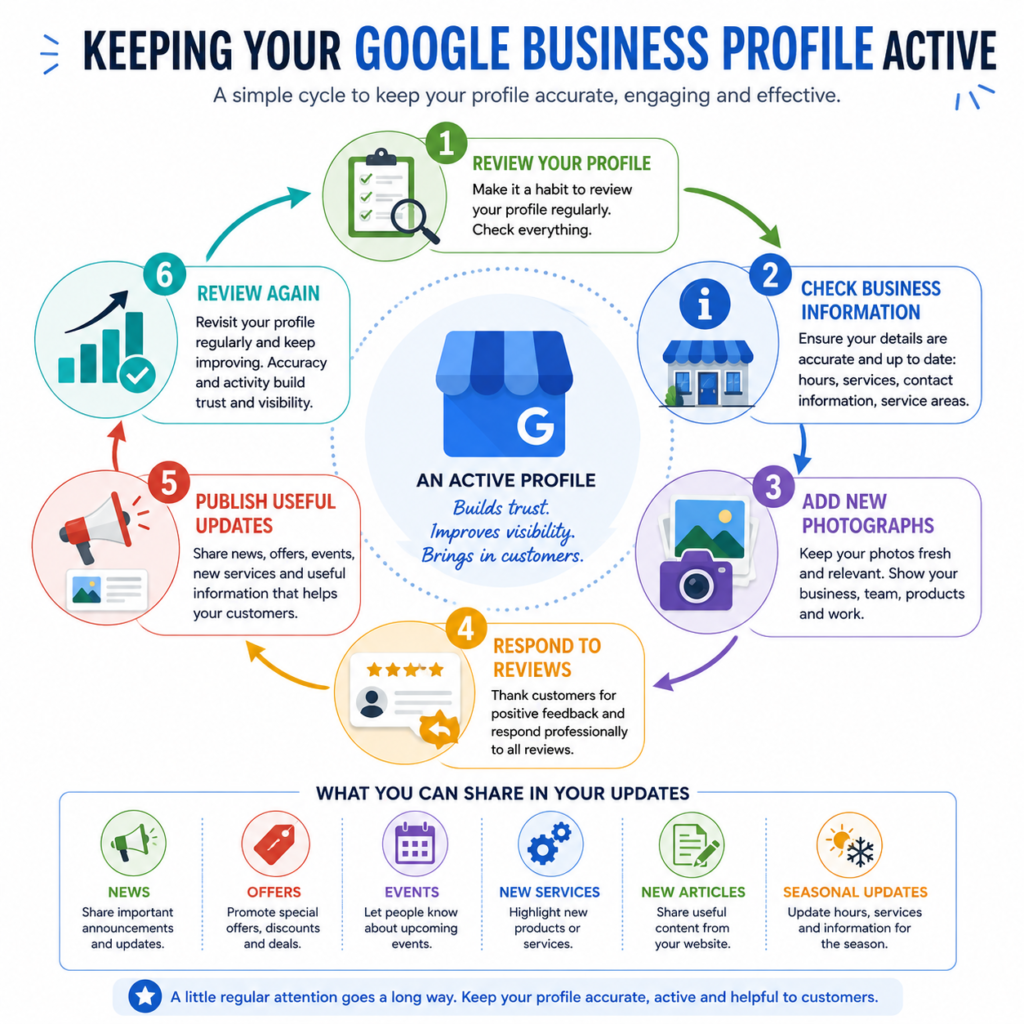
A Google Business Profile shouldn’t be something you create, complete and then forget about. Like your website and other online channels, it needs occasional attention to make sure the information remains accurate and useful to potential customers.
Google Business Profile allows businesses to publish updates that can appear when people find them through Google Search and Maps. These can be used to share news, highlight services, promote offers, announce events or simply let customers know about something happening within the business.
For example, you might publish an update when you introduce a new service, complete an interesting project, publish a useful article on your website or make a seasonal change to the way your business operates. Restaurants might highlight a new menu, retailers could promote new products, while consultants and professional businesses could share advice or link to recently published content.
Updates don’t need to be lengthy. A short piece of useful information accompanied by a relevant image and a clear next step is often enough. The objective is to give someone who discovers your profile another reason to engage with your business.
Regular activity also helps ensure that you notice when other information needs attention. Opening hours change, services evolve, photographs become outdated and businesses move into new areas. Reviewing your profile periodically gives you an opportunity to identify and correct these things before they cause confusion for customers.
There is no need to publish simply for the sake of appearing active. Quality and relevance are more important than filling your profile with unnecessary updates. A practical approach for many small businesses is to review the profile regularly and publish whenever there is something genuinely useful to share.
The important thing is to treat your Google Business Profile as an active part of your online presence rather than a directory listing that was completed once and forgotten.
The Power of Good Photography
Photographs are one of the quickest ways for potential customers to form an impression of your business. Before they read your description, browse your services or visit your website, the images on your Google Business Profile can help them understand what your business looks like and what they can expect.
Good photography doesn’t necessarily mean professional photography. For many small businesses, clear, well-lit and genuine photographs taken with a modern smartphone are perfectly adequate. What matters most is that the images accurately represent your business.
The type of photographs you use will depend on what you do. A shop, restaurant or other customer-facing business might show its exterior, interior, products and facilities. A tradesperson could show examples of completed work, while a consultant or professional service business might include photographs of the people behind the business, the working environment or appropriate examples of the services being delivered.
Photographs of your premises can also have a practical purpose. Showing the exterior of a shop, office, restaurant or other venue can help customers recognise it when they arrive. Images showing entrances, parking or accessibility features may also be useful where appropriate.
Try to use your own photographs wherever possible. Generic stock photography might look polished, but it tells potential customers very little about your actual business. Authentic photographs of your team, premises, products and work provide evidence that there is a real organisation behind the profile and can help build familiarity and trust.
Your photographs should also remain current. If your premises change, your team grows, products are updated or you complete new work worth showing, add new images rather than allowing the profile to become a snapshot of how the business looked several years ago.
Think of your photographs as a visual introduction to your business. They don’t need to be perfect, but they should be clear, relevant, authentic and useful to someone deciding whether your business is right for them.

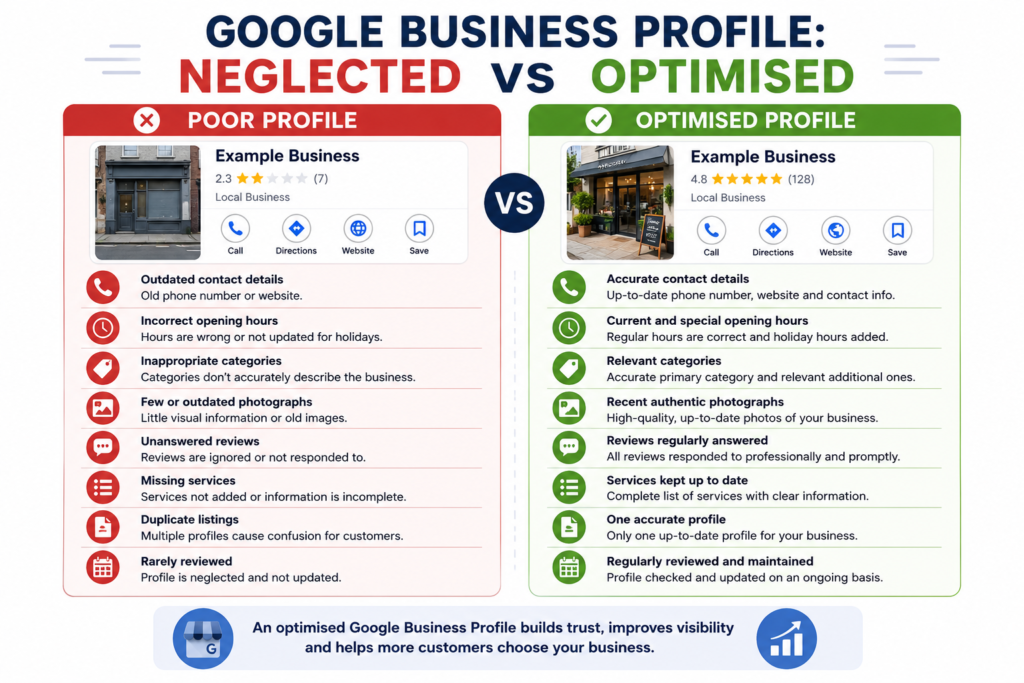
Common Google Business Profile Mistakes
Even when a Google Business Profile has been created and verified, relatively simple mistakes can reduce its usefulness to both customers and the business. Most of these problems are easy to correct, but they are often overlooked because nobody regularly checks the profile.
One of the most common problems is inaccurate or outdated information. Telephone numbers change, websites are redesigned, opening hours are altered and businesses introduce new services. If this information isn’t updated on your profile, potential customers may be given incorrect information at precisely the moment they are considering contacting you.
Choosing inappropriate business categories is another mistake. Your primary category should accurately describe your main business activity, with additional categories used only where they genuinely represent other parts of the business. Adding unrelated categories in an attempt to appear in more searches can make your profile less accurate rather than more useful.
Opening hours are particularly easy to neglect. Normal hours may be correct throughout most of the year but become inaccurate during bank holidays, Christmas, Easter or other periods when the business operates differently. Using Google’s special hours feature helps prevent customers travelling to or contacting a business when it is closed.
Another common mistake is ignoring customer reviews. Reviews left without responses can make a profile appear neglected, while defensive or argumentative responses to criticism can create an even worse impression. Reviews should be treated as part of your customer communication rather than something that happens separately from the business.
Duplicate profiles can also cause confusion. Businesses sometimes create a new profile after moving premises, changing ownership details or simply forgetting that an older listing already exists. Where duplicates occur, they should be investigated and resolved rather than allowing several conflicting versions of the same business to remain online.
Incomplete service information, old photographs and profiles that haven’t been reviewed for months or years are further signs of neglect. None of these problems is particularly difficult to address.
The biggest mistake is therefore probably the simplest: treating Google Business Profile as a one-off setup task. Your business changes over time, and your profile should change with it. A short regular review can prevent many of these problems and ensure that customers continue to see an accurate and professional representation of your business.
Five Quick Google Business Profile Improvements You Can Make Today
Improving your Google Business Profile doesn’t have to become a major project. There are several useful changes you can make in a relatively short time that will immediately make your profile more accurate, informative and useful to potential customers.
1. Check Your Business Information
Start by looking at your profile as though you were a potential customer. Check your telephone number, website address, opening hours and service areas. Make sure everything is still correct and pay particular attention to any information that may have changed recently.
2. Add Some Recent Photographs
Look through the photographs currently displayed on your profile. If they are old or there aren’t many of them, add a few recent images that genuinely represent your business. These might show your premises, team, products, services or examples of completed work.
3. Respond to Your Reviews
Check whether there are customer reviews you haven’t responded to. Thank customers who have left positive feedback and respond professionally to any criticism. You don’t need to write lengthy replies; a genuine and appropriate response is more valuable than a generic message copied to every customer.
4. Review Your Products and Services
Make sure the services or products shown on your profile still represent what your business actually offers. Add anything important that’s missing and remove or update information that is no longer relevant. This is also a good opportunity to check that your primary and secondary business categories remain appropriate.
5. Publish a Useful Update
Finally, give customers something current to see. You could share a recent article, introduce a service, announce an event, highlight completed work or provide a useful piece of advice. Choose something genuinely relevant rather than publishing simply because you feel you should.
None of these actions requires a large investment of time or money. Taken together, however, they can make a noticeable difference to the quality of your profile.
Once you’ve completed these five steps, set yourself a reminder to review your Google Business Profile regularly. A few minutes of attention every so often is much easier than discovering months later that potential customers have been seeing outdated information about your business.
Conclusion
Google Business Profile is one of the most accessible and valuable online tools available to a small business. It costs nothing to create, can place useful information directly in front of people searching for the products or services you provide, and gives potential customers several ways to learn about and contact your business.
But simply having a profile isn’t enough.
The businesses that get the greatest value from Google Business Profile are those that treat it as an active part of their online presence. That means keeping information accurate, choosing appropriate categories, maintaining current opening hours, adding genuine photographs, encouraging customer reviews, responding to feedback and updating the profile as the business changes.
None of this needs to become a major marketing exercise. As we’ve seen throughout this guide, many of the most useful improvements are relatively straightforward. The important thing is to make maintaining your profile part of your normal business routine rather than something you set up once and then forget.
Your Google Business Profile should also work alongside your website, social media, local listings and wider digital marketing. Together, these different elements help potential customers discover your business, understand what you offer and decide whether they trust you enough to take the next step.
If you haven’t looked closely at your profile recently, start with the five improvements outlined above. Check what customers can see today, correct anything that’s wrong and identify the areas that could be strengthened.
Small, regular improvements can add up to a much stronger presence in local search — and, most importantly, make it easier for the right customers to find and choose your business.
Keep Improving Your Online Visibility
Google Business Profile is just one part of building a strong online presence. For more practical advice on local search, SEO, websites and digital strategy, explore our latest articles or subscribe to the Digital Strategy newsletter for future guides, checklists and downloadable resources.
If you’d prefer some help reviewing or improving your Google Business Profile, Digital Direction provides practical consultancy and support for small businesses looking to strengthen their online visibility.